


- A website that isn't converting usually has one of three problems: the wrong visitors, an unclear offer, or enquiries that never reach you.
- More traffic won't fix it, so check that enquiries reach your inbox before you spend more on ads or SEO.
- Search Console and GA4 show who visits and what they do, for free, but only a test enquiry shows whether messages arrive.
- Fix in this order: enquiries reaching you, then the right visitors, then a clear page.
You run a service business, the site gets visits, and the enquiries aren't coming in. The usual first move is a bigger ad or SEO budget.
If the website isn't converting the visitors it already has, more traffic only costs more. That's usually when the budget gets cut and a website design overhaul gets planned, before anyone knows what's actually broken.
You can find where visitors leave in an afternoon with free tools like Google Search Console and GA4. Fix the problems you've confirmed, and use the numbers to decide whether you need a redesign at all.
Find what to fix first: the 10-minute triage
A visit only becomes a lead after five steps: people find you, understand what you sell, trust you, contact you, and get a reply. The first step that fails is the one to fix.
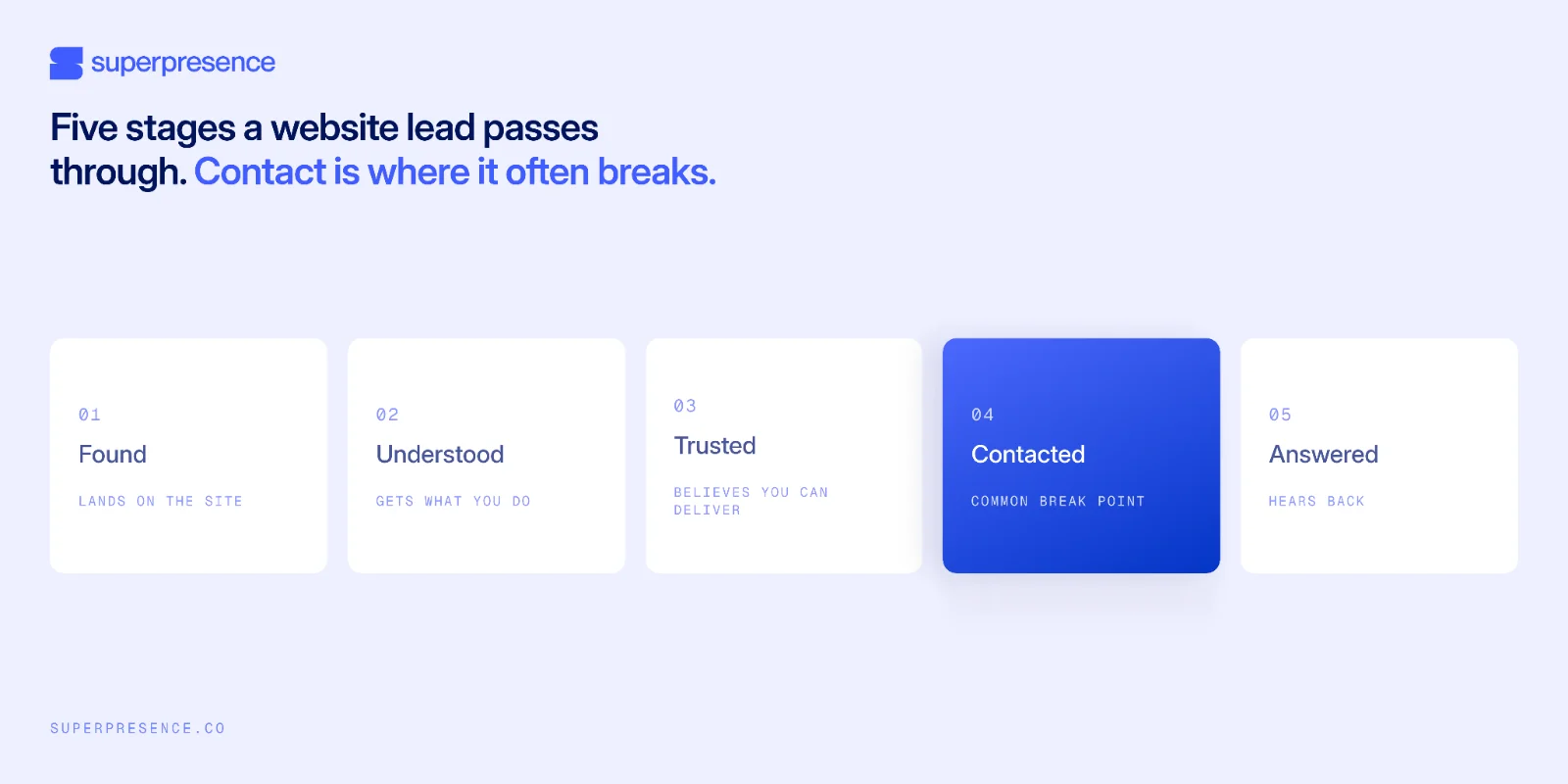
If Search Console shows almost no impressions, people aren't finding you. That's a visibility problem, so start with seo web design. If people visit but don't enquire, run these six checks in order, and your first fix is the first check that fails.
- Contacted: submit a test enquiry on your phone. Does it reach an inbox someone checks? (2 min)
- Tracking: open GA4. Does GA4 record your test enquiry as a key event? (2 min)
- Found by buyers: open GA4 Traffic acquisition and Search Console Performance. Are visits coming from buyers in your service area? (2 min)
- Understood: read your homepage as a stranger for five seconds. Could you say what the business sells and for whom? (1 min)
- Contacted, on mobile: load your main page on a phone and tap the primary call-to-action button. Does it work and take you to a form or contact option? (2 min)
- Trusted: look beside your main button. Is there a specific result or a named client there? (1 min)
The checks go from cheapest to most expensive to fix. Checks 1 and 2 make sure enquiries reach you and get counted, because if they don't, you can't trust anything else you measure.
Check 3 shows whether your visitors are likely buyers at all, because few enquiries from the wrong visitors can look like a problem with the site. Checks 4 to 6 test the page itself, which costs the most to change, so check it last.
If you'd rather someone else ran the checks, our free website review tests every way a visitor can contact you and tells you what to fix first.
9 reasons your website isn't converting
When a site isn't converting, the cause is usually one of these nine problems, listed in the order to check them.
1. Your form or WhatsApp link doesn't actually deliver
Your contact button can look like it works while no enquiries reach you. Test every form, WhatsApp link and call button yourself, on mobile and desktop, and check the message lands in an inbox someone reads. You'll see contact clicks in analytics and nothing in the inbox.
Form plugins break after updates, notifications go to an old email address, and WhatsApp links get typed wrong when the site is built. GA4 records the click either way and can't tell you whether the message arrived.
We test every enquiry path before touching anything else on a site, because if enquiries don't reach you, no other fix matters. The test takes minutes:
- Submit every form on the site as a customer
- Tap every WhatsApp and call link on a phone
- Repeat both on desktop
- Check the spam folder of the address that receives notifications, and confirm the message arrives in an inbox someone reads
To make sure it keeps working, send a test enquiry regularly and check that GA4 records it as a lead.
2. You can't see conversions, so you're guessing
Define the one action that counts as a lead, whether a completed form or a booked call, and mark it as a key event in GA4. Until you do, you can't measure whether any other fix on this list worked.
You'll see a report showing more leads while your inbox gets the same number of enquiries. Usually the report counted button clicks along with completed forms, so people who only clicked were counted as leads.
The fix has four steps:
- Define the lead action in writing
- Create or identify the event in GA4
- Mark it as a key event, following Google's instructions
- Test it
Submit a test enquiry and watch the event appear in the real-time report.
GA4 now calls these key events, so older tutorials that say "mark as conversion" are describing the same thing.
3. The traffic you get isn't from buyers
More visits doesn't mean more buyers. Open GA4's Traffic acquisition report and Search Console's Performance report and compare where visits come from with which enquiries actually arrived.
You'll see visits go up while enquiries stay the same. Blog articles attract people who are researching, your pages rank in countries you don't serve, or ads reach people who aren't looking to buy.
A service business publishes an informational article and traffic rises, but the service page still gets a fraction of the visits and the enquiry count doesn't move.
Most of the extra visitors were never going to buy. Check which pages and sources your enquiries actually came from, and use the country and device filters in Search Console.
Confirm by comparing landing pages in GA4: if the service pages bring enquiries and the articles don't, the problem is the kind of visitors you're getting.
4. Your headline sounds like every other website
The headline should name the service, the customer, and the outcome. A visitor should know within seconds whether the page is for them.
A headline any competitor could publish leaves the visitor to work out who the page is for. First drafts often end up like this, because they describe the business instead of the buyer.
Compare two hero headlines. "We are a trusted partner delivering innovative, end-to-end solutions that empower ambitious clients worldwide" could be on any company's website.
"We stop Hong Kong expats overpaying tax" names the customer and the outcome in seven words.
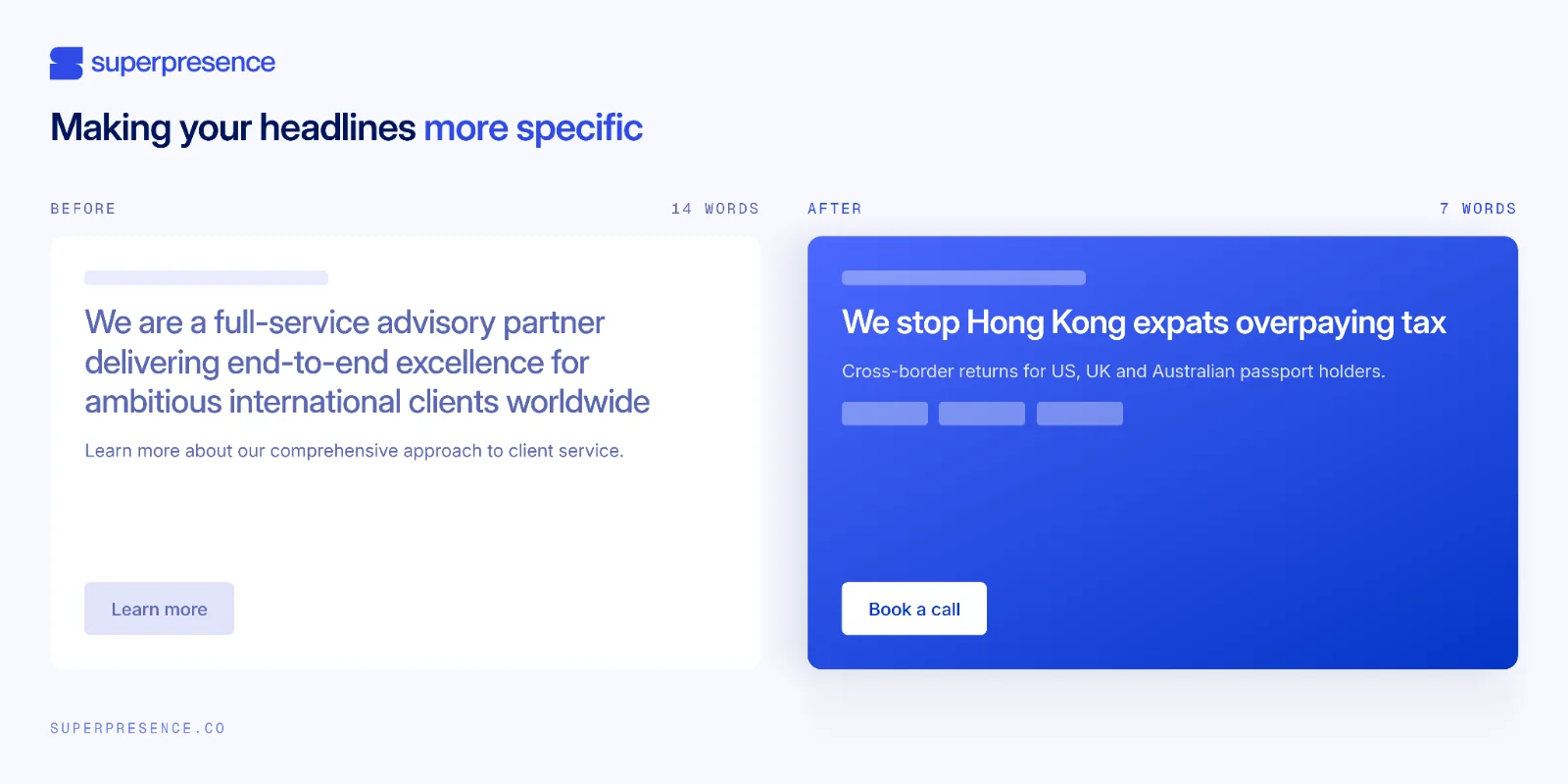
Confirm it with a stranger test: show someone the headline for five seconds, then ask who the site is for and what it does. If they hesitate, the headline is still too general.
5. Unclear calls to action (CTAs)
Give each page one main action, repeat it wherever a visitor might be ready to act, and write the button so it says what the visitor gets. The symptom is a page with five equal links and no obvious next step.
Buttons like "Submit" and "Learn more" describe the action and don't say what the visitor gets for clicking. When every link looks equally important, the visitor has to work out what to do next.
Use one main action per page, with button text that says what the visitor gets:
- "Submit" becomes "Get my free quote"
- "Contact us" becomes "Book a 20-minute call"
- "Learn more" becomes "See pricing"
Track clicks on the new primary button as an event, and watch enquiry volume from that page, because no button text works best on every site.
6. Contacting you takes too much effort
Forms that people start and don't finish are usually caused by a handful of contact page mistakes. Cut every field you don't actually need, say what happens after submission, and keep a phone or WhatsApp link visible from every page.
The three checks:
- Ask only for a name, contact details and one question that tells you whether the enquiry is a good fit
- A one-line "here's what happens after you send this"
- Phone or WhatsApp reachable from every page
Confirm by comparing enquiries from that page over a fixed period before and after the change.
7. Nothing proves you can deliver what you claim
Put proof on the service page, next to the main button, where the visitor decides whether to contact you. Make it specific enough for a stranger to check.
The page claims results but shows none beside the claim. The testimonials and case studies sit on a separate page, and a visitor deciding whether to enquire rarely goes looking for them.
Good proof is a specific result, a named client, a client logo or a two-line case study, each kept short.
Asana's operations page is a good example. Its customer story puts the result in the headline, "How FedEx achieved 9x faster speed-to-market", and adds a second number, 1,200+ hours saved a year. The visitor sees both numbers without leaving the page.
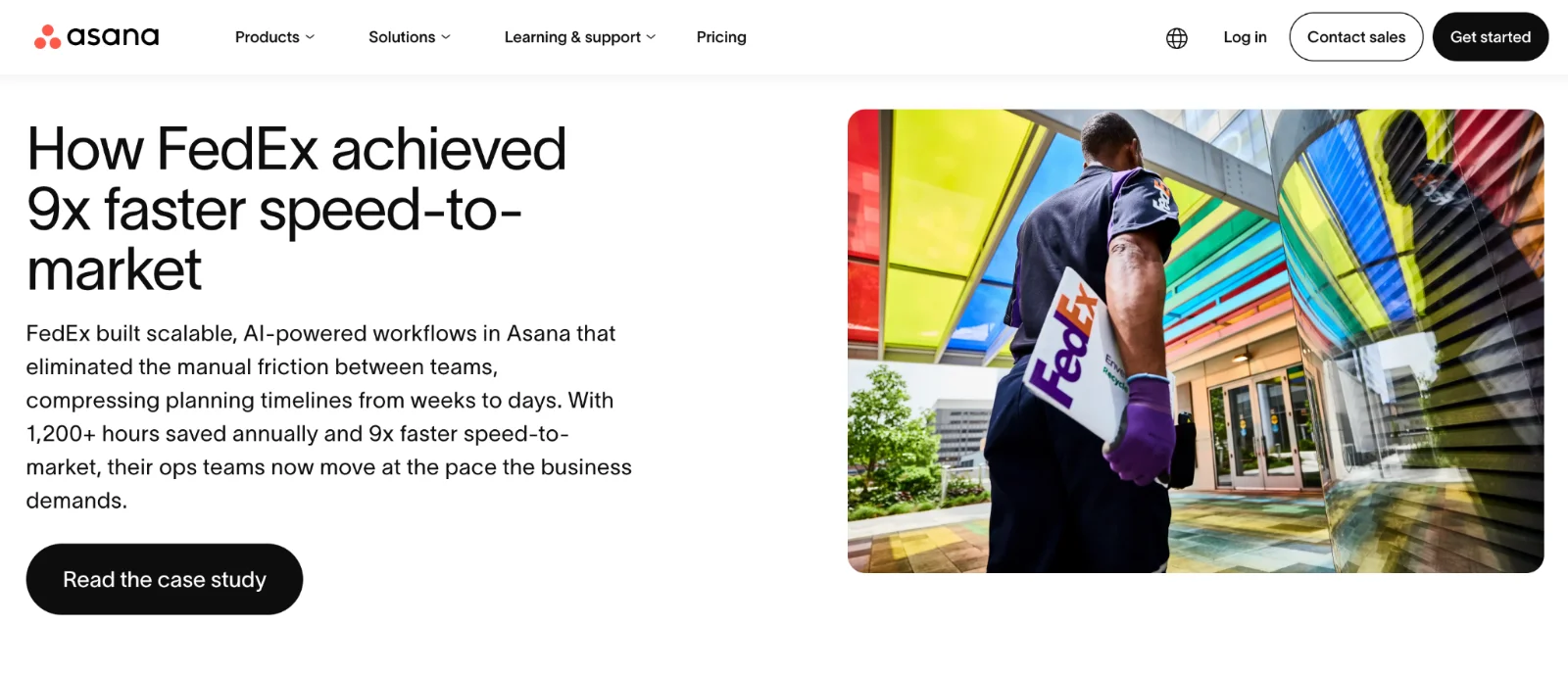
Move the proof next to the button and compare that page's enquiries over a fixed period. This doesn't work better on every site than a separate testimonials page, so treat it as a test, and ask your next three enquirers what made them get in touch.
8. The page is slow on a phone
Check the device split in Search Console first. If most visits come from phones, mobile speed matters more than desktop speed. Test your pages against Google's Core Web Vitals targets and fix what's slowing them down.
The usual causes are large images, sliders, too many plugins, and too many scripts. Google and SOASTA's 2017 research found predicted mobile bounce probability rises roughly 32% as load time goes from one second to three.
Run your page through PageSpeed Insights and Search Console's Core Web Vitals report to see what's slow. Fix it, then test again to confirm the scores improved.
9. Leads arrive, then go cold
The site can be working perfectly and you still lose the leads after they arrive. Check who receives enquiries, who is responsible for replying, and how fast the reply goes out.
Analytics logs the enquiries, but none of them turn into conversations. Notifications go unread, no one is responsible for replying, and replies go out late or not at all. Fix it with an enquiry log with four columns:
- Received
- Owner
- First-reply time
- Outcome
There's no standard reply time that suits every business, so write down how long your replies take now and work on making them faster. Compare the log against incoming notifications on a fixed schedule.
Do you need a fix or a redesign?
Fix the existing site when its layout and pages work and the problems are on specific pages.
Consider a rebuild only when the page layouts don't work on phones, the site can't host the service pages you need, or forms and tracking can't be made reliable without rebuilding.
Even then, start with the list of fixes, and rebuild only the parts the fixes can't solve. The list also tells you what the new site must keep, and gives you numbers to compare the new site against.
Before anyone quotes you a rebuild, ask for a free website review and let what it finds decide between fixing and redesigning.
FAQs
How long after fixing these problems will I see more enquiries?
It depends which problem you fixed. Fixes to delivery and tracking show results within days, because you can test them yourself straight away. Copy and targeting changes show up over the following weeks as new qualified visitors arrive, and only if you set up the key event that lets you see it.
My site used to get leads and suddenly stopped. What changed?
Start by submitting a test enquiry yourself, because a form or notification that broke during a site update looks exactly like leads suddenly stopping. Then check Search Console for a visibility drop and GA4 for a source change. If the test enquiry arrives and visits haven't dropped, look at what changed on the page itself.
Is my platform (WordPress, Webflow or Wix) the problem?
Almost never by default: WordPress, Webflow, and Wix can all host sites that generate enquiries. Blame the platform only once you've verified its templates, forms, or tracking can't support the fixes you need. In most cases, the fixes from the triage work on the platform you already have.
Will adding a chatbot or AI assistant get me more leads?
A chatbot won't add leads by itself. If the offer is unclear, the contact button is hard to find, or enquiries go unanswered, a chatbot has the same problems. It also adds another way to contact you that you have to test and keep working.
What's a normal enquiry rate for a website?
There's no single number for "normal". Published benchmarks combine many industries and many kinds of conversion, so they rarely match a service business taking enquiries. Track your own number instead: count enquiries per 100 visits in GA4, and compare it month to month.
From Sydney, Australia with a decade in Asia, Kevin built his expertise driving product and growth at tech startups across fintech, logistics, consumer apps, and crypto. He founded Superpresence with this expertise and passion, helping businesses create high-converting web experiences and digital growth strategies that drive real revenue impact.
Stay ahead of the curve! Subscribe now for expert insights
Hear directly from clients about their journey with Superpresence— our collaboration, expertise, and the results achieved.