

- Webflow gives you a visual website builder, a content system for blog posts and case studies, on-page editing for your team, and hosting, all in one account.
- A Webflow developer or agency builds the site. After launch, your marketing team updates it themselves with a $15-a-month editing login.
- A typical marketing site with a blog runs on the Premium plan at $300 a year billed yearly. A site with no blog runs on Basic at $180.
- Webflow suits a custom marketing site that a team keeps changing. It doesn't suit large stores or web apps, and moving off it later means rebuilding the site.
Webflow often comes up when a business plans a new website, usually because a designer recommends it. It's a platform for designing, building and hosting websites.
A designer lays out the pages on a visual canvas while Webflow writes the code behind them. After launch, your team updates pages and blog posts in the browser. Prices are Webflow's own, as published in October 2026.
We pick Webflow when a non-technical team will run a marketing site. The build itself needs a designer or an agency offering Webflow development services. It's the wrong fit for large online stores, web apps, or a company with nobody to build it.
What you get with Webflow
A Webflow account gives you four tools in one place: a visual builder, a content system, on-page editing and hosting.
| What you get | What it does | Who uses it |
|---|---|---|
| Visual builder (Webflow calls it the Designer) | A canvas for laying out pages. Webflow writes the HTML, CSS and JavaScript as you build. | Your Webflow developer or agency |
| Content system (CMS) | Stores content you publish again and again, such as blog posts, case studies or team profiles. Each item fills the same layout. | Your marketing team, adding new posts and items |
| On-page editing | Changes the words and images on any page while you look at the live layout | Your marketing team, updating existing pages |
| Hosting | Runs the site on AWS infrastructure with Cloudflare's global CDN, with SSL on every site | Nobody on your team, because Webflow manages it |
The Designer is software, so you don't get a person with it. Someone still has to build the site, either your own web designer and developer or an agency.
The CMS holds repeatable content, so a new blog post is an entry with a title, image and body that appears in the blog layout. On-page editing covers everything else, such as changing a homepage headline or swapping a photo on the about page.
In Webflow, you build once and reuse. The designer sets styles once, so a button or heading looks the same on every page. Repeating sections like a header or pricing block become components, edited in one place.
The blog works the same way: the developer lays out one blog post template, and every post you publish inherits it.
Webflow also gives your designer polished animation, such as sections that slide in as visitors scroll. It runs on GSAP, an animation toolkit Webflow bought in October 2024 and made free in April 2025, so these effects need no extra software or licence.
What is Webflow used for?
Companies mostly use Webflow for their marketing website: the homepage, service pages, blog and landing pages that a marketing team changes often.
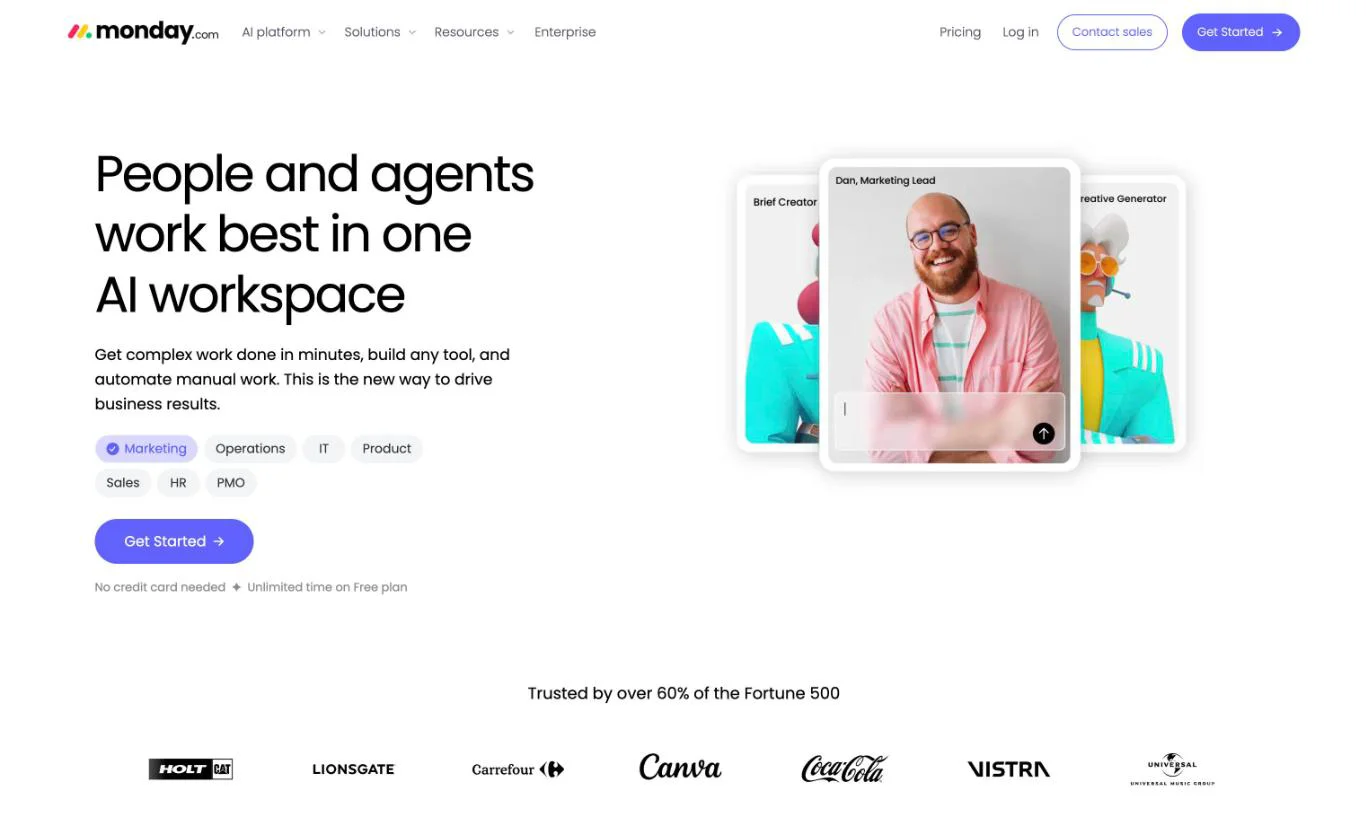
monday.com, the work-management software company, is a well-known example. Its homepage runs on Webflow, while its blog stays on WordPress, which shows a large company can run its marketing pages on Webflow alongside other tools.
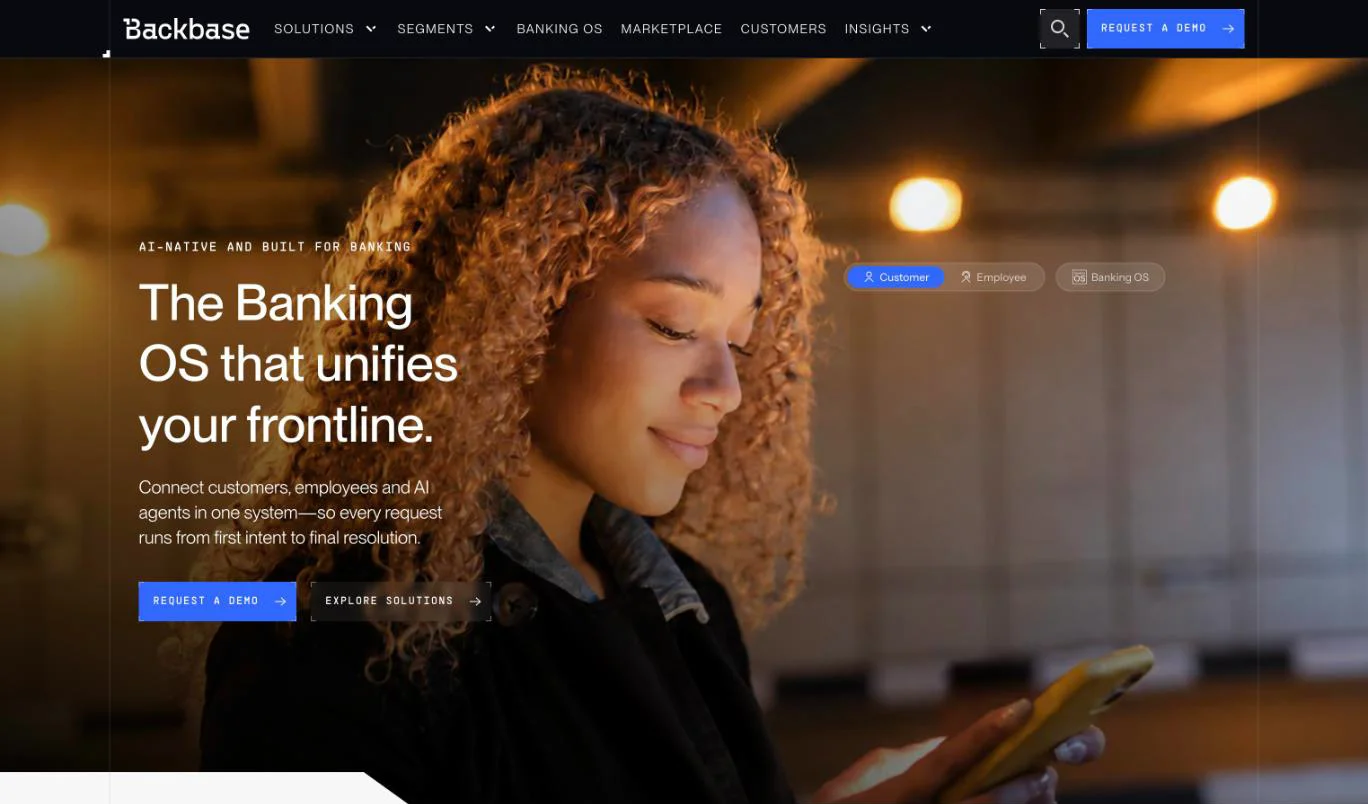
Backbase, which builds banking software, moved its whole global website to Webflow in 8 weeks, according to Webflow's case study. A team of two now runs the site, and major updates that used to take six to eight months now take days or weeks.
Greenhouse, Ebury and Healius, an Australian healthcare group, also build on Webflow. Webflow reports that Healius migrated from WordPress in six weeks with "3x cost savings".
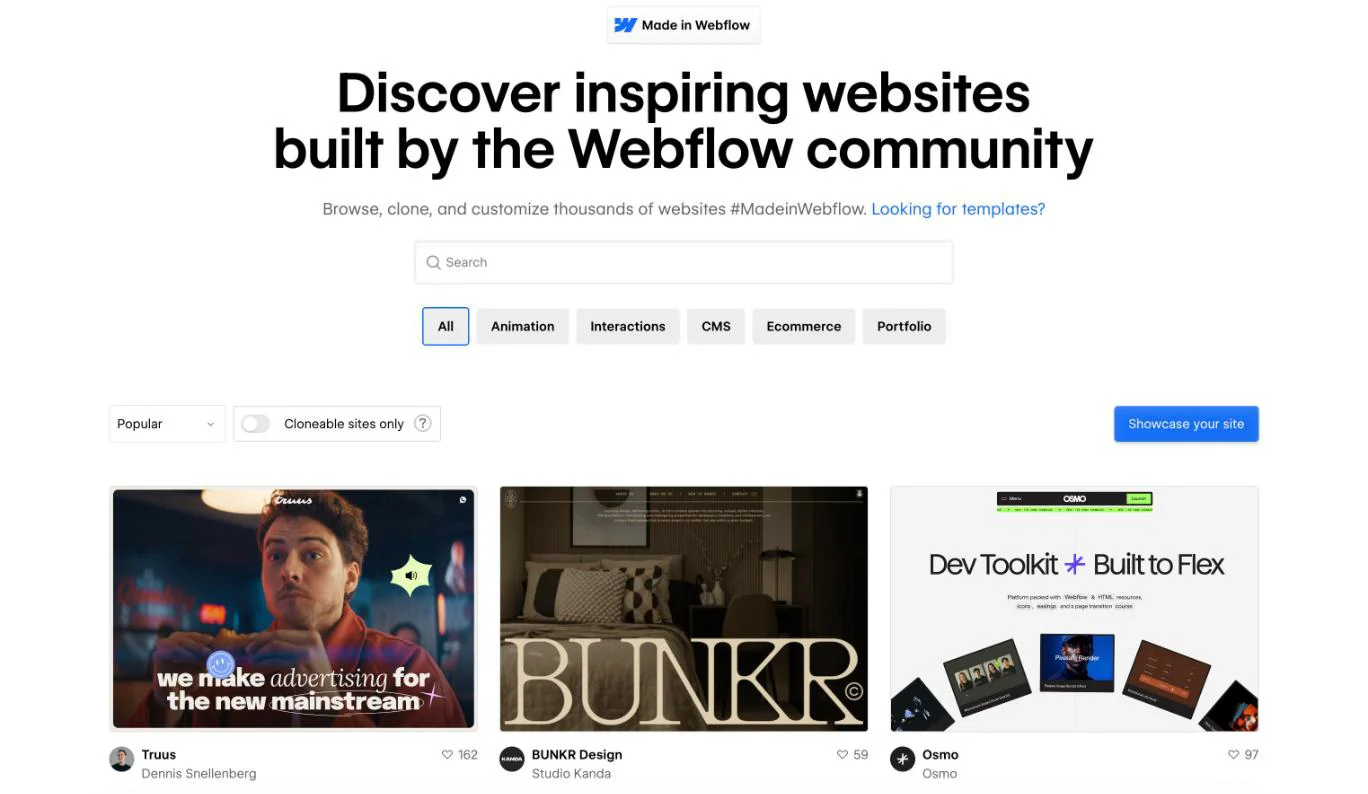
For more examples, Webflow runs an official showcase called Made in Webflow. It lists thousands of sites built on the platform.
Webflow's advantages and limitations
Webflow decides where your site is hosted and which extras you can install. In exchange, the finished site is simple to run.
Advantages
- Less development work. Webflow writes the front-end code and runs the servers, so you don't need back-end engineers or a server to manage. A Webflow developer still builds the site from the designer's files and connects tools such as your CRM, but the job is smaller than coding a site from scratch.
- Your team updates it themselves. New blog posts, case studies and text changes go live without a developer ticket or a wait.
- Nothing to maintain. Webflow runs the hosting, security and SSL. There are no plugins to update and no server to patch.
- A design made for your brand. The site is built to your design rather than fitted into a theme, so it can look and read like your company.
- SEO basics built in. Sitemaps, redirects and meta tags come with every site, with no plugins to install.
Limitations
- No plugin library like WordPress. You can't install a plugin for every extra feature. Webflow builds forms and SEO settings in, and covers extras through its Apps marketplace and paid add-ons.
- Hosting only on Webflow. You can't move the site to your own server or choose where it's hosted.
- CMS limits. The Premium plan holds 20,000 items across 40 Collections. That's plenty for a blog, but tight for a site built on thousands of listings.
- Moving off is a rebuild. Your content leaves as spreadsheets, so a new platform means building the site again.
- Someone skilled has to build it. The Designer is a professional tool, so you'll pay a Webflow developer or agency.
- Billed in US dollars. The cost moves with the exchange rate.
Is Webflow good for your business?
Webflow is good for a business whose site is mainly for marketing and changes often. On a site like that, your team publishes without a developer, and the plugin and hosting limits rarely matter.
| Your situation | Is Webflow a fit? | Why |
|---|---|---|
| Marketing site with a blog your team updates often | Yes, on Premium | Your team publishes without a developer, and there's nothing to maintain |
| Simple company site with no blog | Yes, on Basic | Low upkeep, though a simpler builder also works if nobody will update it |
| Site in English plus Thai or Chinese | Yes, with Webflow Localize Advanced | Localised URLs help each language rank in its own market |
| Online store with thousands of products | No | Even the largest plan caps at 15,000 products, so a dedicated commerce platform fits better |
| Web app or customer portal | No | Logins and custom features need a development stack, with Webflow an option for the marketing pages |
| No budget for a builder | Not yet | Someone skilled has to build it, so a template platform works until you can fund a build |
| Data must stay in one country | No | Webflow doesn't let you choose where the site is hosted |
Webflow costs more than a template builder. The extra cost pays off when the site brings in enquiries and sales. If you're still comparing platforms, start with how to choose a website builder.
What a Webflow site costs per year
A typical marketing site with a blog costs $300 a year on Premium, billed yearly. A site with no blog costs $180 a year on Basic.
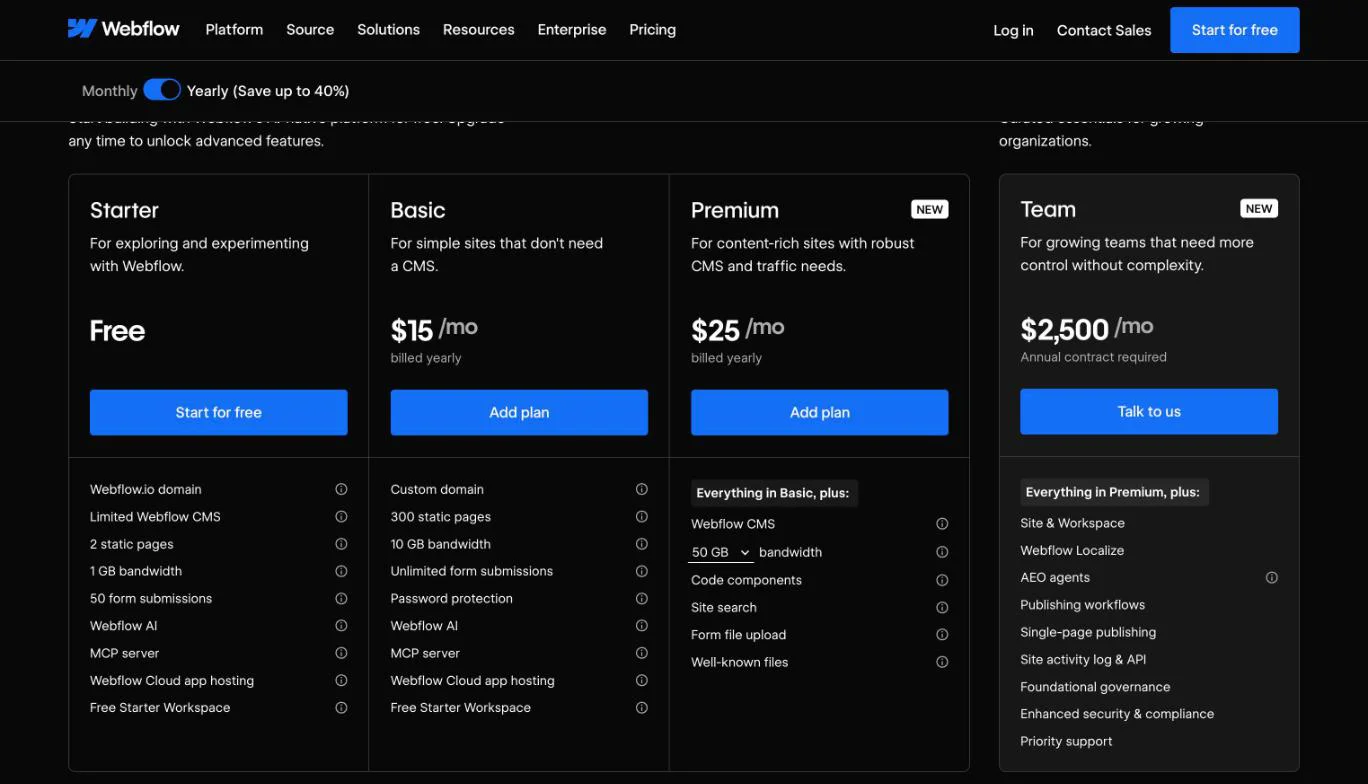
Site plans, per month billed yearly / monthly, are listed on Webflow's pricing page. Starter is free but gives you a webflow.io address and 2 pages. Basic is $15 / $25 with no CMS, and Premium is $25 / $39 with 20,000 CMS items, 40 Collections and 50 GB of bandwidth.
Team is $2,500 a month on an annual contract only, and Enterprise is custom. Webflow merged its old CMS and Business plans into Premium on 13 May 2026, and agency- and freelancer-managed sites move onto the new plans from 16 November 2026.
If someone quotes you the old $14 or $23 plans, they're working from a retired price list. Logins for your team and add-ons are charged on top of the site plan.
Who edits your site after launch?
Your marketing team handles everyday content changes, and your Webflow developer or agency handles anything that changes how the site is built. Each person needs a login, which Webflow calls a seat.
| Who | What they do | Seat they need | Cost |
|---|---|---|---|
| Your marketing team | Change text and images, publish blog posts and case studies | Limited seat | $15 a month billed yearly, $19 monthly |
| Your Webflow developer or agency | Add new page types, change layouts, connect tools like your CRM | Full seat, with access to the Designer | $39 a month billed yearly, $45 monthly |
| Anyone who only approves changes | Review the site before changes go live | Reviewer seat | Free |
The free Workspace Starter plan includes one full seat. If an agency manages your site from its own Workspace, it can give your team client seats instead.
This changed in 2026, when Webflow retired its old Editor on 4 August, as its migration page explains. Anyone who edited through the old Editor moved to one of these seats automatically.
Is Webflow hard to learn?
Building a site in Webflow is hard for a business owner, but managing one after launch isn't, because the two jobs need different skills.
Designing and building pages in the Designer takes web design knowledge. That's why companies hire a web designer or an agency to take them through the web design process, and why your marketing team never has to learn the Designer.
After launch, your marketing team can learn to edit pages and publish blog posts quickly, because it happens on the page in the browser. Webflow University runs a free Webflow course for beginners that needs "no prior experience".
Is Webflow good for SEO and AI search?
Yes, the technical basics are built in, and you don't install plugins to get them. Webflow handles the technical side of Webflow SEO, but where your site ranks still depends on the content and the structure your build gives you.
What's included on every site:
- Auto-generated XML sitemap, robots.txt rules and control over page URLs, without code
- A 301 redirect manager, which Webflow says needs "no engineering help required"
- Meta titles and descriptions per page, set from CMS fields as a pattern on CMS pages, with Webflow AI able to fill missing metadata
- Schema markup managed in Webflow, generated with AI or added by hand
- Alt text controls, with AI generation one image at a time or in bulk
- Clean semantic HTML and SSL on every site
Webflow won't decide your page structure, write headings that match what buyers search for, or link your pages together sensibly. Those come from the build and from whoever writes the content.
Webflow also sells AEO (answer engine optimisation), a set of tools aimed at visibility in AI search answers. It's on Team and Enterprise plans.
Webflow add-ons
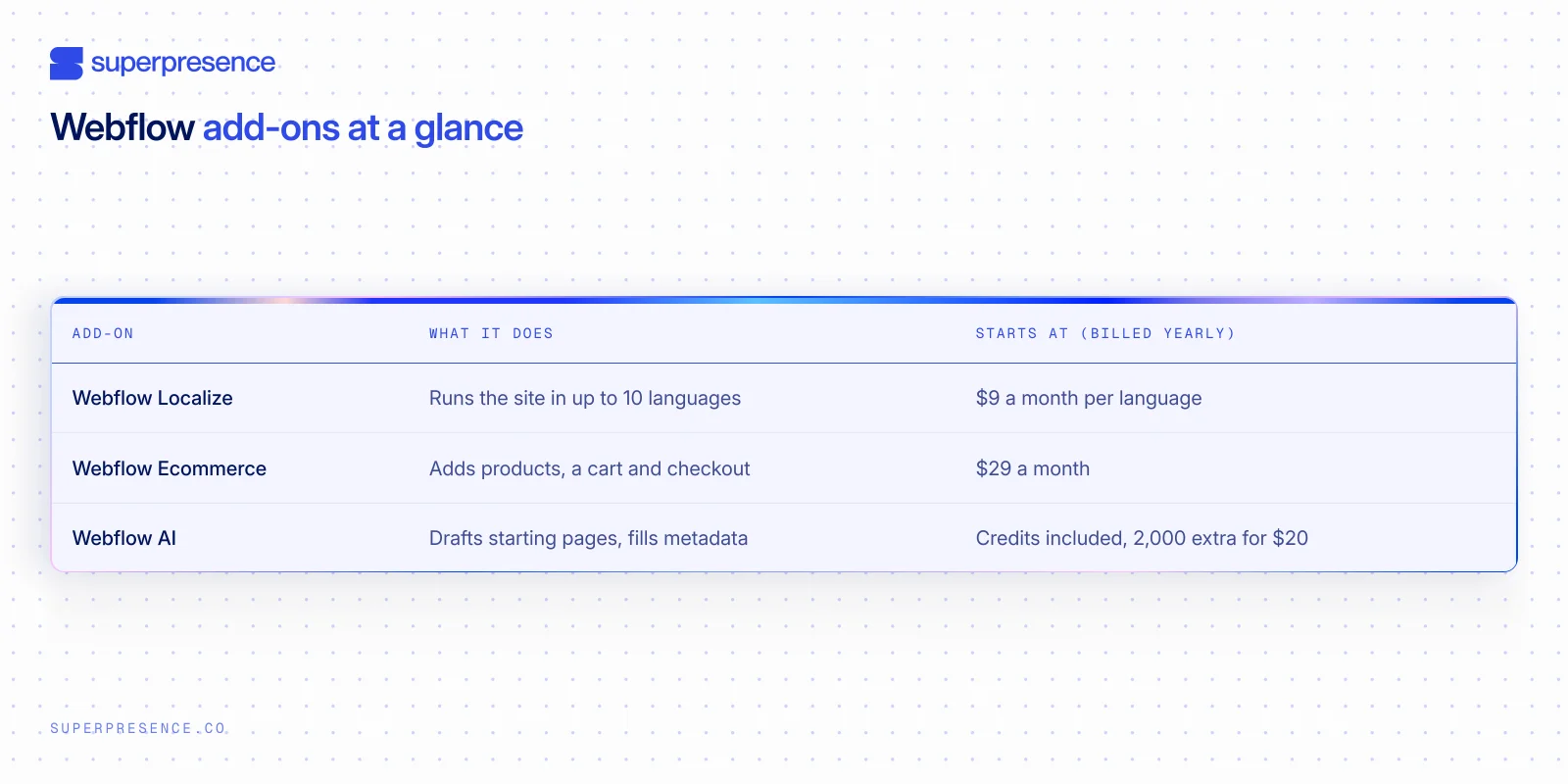
Webflow sells three add-ons that change what a site can do: Webflow Localize, Webflow Ecommerce and Webflow AI.
Webflow Localize
Webflow Localize is Webflow's add-on for running a site in more than one language. It translates static pages and CMS content, with per-language images, alt text, styles and typography. AI translation gives you a first pass, then you edit by hand or connect a translation management system.
Localize comes in two tiers, billed yearly per language: Essential at $9 a month for up to 3 languages, and Advanced at $29 for up to 10. Only Advanced gives you localised URLs in subdirectories, like .com/th/, plus automatic visitor routing. Every language version also gets an auto-generated sitemap with hreflang tags.
Webflow Ecommerce
Webflow Ecommerce is Webflow's built-in online store, which adds products, a cart and checkout to the same site. It runs on three plans, billed yearly. Standard is $29 a month with 500 items and a 2% transaction fee.
Plus is $74 with 5,000 items and Advanced is $212 with 15,000 items, both with no transaction fee. Payments run through Stripe and PayPal, with Apple Pay, Google Pay and Microsoft Pay through Stripe.
Webflow notes Stripe or PayPal may not be available in every country, but Stripe lists Australia, Singapore, Hong Kong and Thailand as supported. Webflow Ecommerce suits a store that sits inside a marketing site, such as a firm selling a handful of products alongside its services.
Webflow AI
Webflow AI is the set of AI features built into Webflow. The AI site builder generates a starting site of up to five pages from a prompt, which a designer then refines before launch.
Webflow AI also fills missing meta titles, descriptions and alt text, and Webflow Localize uses AI for a first translation pass. AI credits come with every Workspace since the May 2026 change, and extra credits are 2,000 a month for $20 billed yearly.
Can you move your site off Webflow later?
Yes, but you'll be rebuilding it. The design exports as code, but your blog posts and other CMS content don't come with it. Forms also stop working in the exported code, and that code can't be imported back into Webflow.
Code export needs a paid Workspace plan. Your CMS content exports separately as spreadsheets (CSV files), one Collection at a time. Layouts and animations don't come with them, so the new platform needs its templates built before the content goes back in.
Moving onto Webflow runs into the same problem, which is why a WordPress to Webflow migration plans the content move before the design. If you're taking a site over from an agency, work through a website handover checklist so every account ends up in your name.
Important:
Put the Site plan and the Workspace in your company's name and billing from the start. An agency-owned account is the hardest thing to unwind later.
What changed at Webflow in 2026
Alongside the May plan change and the August Editor retirement, Webflow repositioned itself, and its homepage now calls it "the agentic web platform for modern businesses".
CEO Linda Tong told TechCrunch in March 2026: "people have historically seen us as a website builder or CMS. We are an agentic marketing platform."
Sidenote:
Webflow says it powers "300,000+ brands", which is the company's own count. Independent measurement by W3Techs puts Webflow at 0.8% of all websites and 1.2% of the CMS market in October 2026.
When we choose Webflow, and when we don't
Superpresence builds its clients' sites on Webflow, Next.js or Framer at the same price, so the choice depends on who will run the site. We pick Webflow when a marketing team will edit pages and publish posts without a developer. For a large online store or a web app with logins, we pick something else.
Most requests to move an existing site onto Webflow become a rebuild instead of a straight migration. Clients usually want the site to look and read better too, so we budget for the design work early. Our Webflow migration services also set up the redirects and check the content matches the old site.
We tell clients to expect about $25 to $40 a month in platform costs for a typical marketing site with a blog. That covers the Webflow Premium plan and the domain.
If you're weighing Webflow for your own company, the useful next step is a look at the site you have now. Our free website review does that: we look at your current site, tell you whether Webflow is the right platform for it, and what we'd keep or rebuild.
FAQ
Is Webflow free?
Partly, yes: the free Starter plan gives you a webflow.io address and 2 pages, enough to try the Designer but not to run a business site. A custom domain and the CMS both need a paid plan, and the cheapest useful options are Basic or Premium billed yearly.
What is a Webflow developer?
A developer who builds sites in the Webflow Designer, usually from a designer's files in a tool like Figma. Webflow generates most of the code, but the developer sets up the CMS, connects tools such as a CRM, and adds custom code where a feature needs it.
Is Webflow still popular?
Yes. Webflow has been trading since 2013, employs 900+ staff across 25 countries and has raised $335M in total funding. W3Techs tracks it as a small share of all websites, but a large base of business sites runs on it.
Is Webflow better than Wix?
They suit different buyers: Wix is cheaper and easier for someone building from templates, while Webflow produces a custom-designed site a marketing team can keep updating, at a higher cost. Our Webflow vs Wix comparison goes through cost, design and who each platform suits.
From Sydney, Australia with a decade in Asia, Kevin built his expertise driving product and growth at tech startups across fintech, logistics, consumer apps, and crypto. He founded SuperPresence with this expertise and passion, helping businesses create high-converting web experiences and digital growth strategies that drive real revenue impact.
Stay ahead of the curve! Subscribe now for expert insights
Hear directly from clients about their journey with Superpresence— our collaboration, expertise, and the results achieved.