SEO web design: How to build a site that actually ranks


SEO is easier to build into a website than to add later. The decisions that affect search start before launch, when you're deciding which pages the site needs, how they connect, how much content they can hold, and how the templates perform.
Yet SEO often gets handed over at the end. The site is designed, built, and signed off, then an SEO specialist is asked to optimise what has already shipped.
SEO web design takes the opposite approach. Search is considered alongside the sitemap, content, design, and development from the start. This article breaks that work into four phases, from planning the site structure to protecting existing rankings through a redesign.
What does SEO web design actually mean?
SEO web design means building a website with search in mind from the start. That means SEO influences the sitemap, page structure, headings, internal links, and templates before the site is built. It’s not the same as launching a finished website and trying to optimise it afterwards.
A template can provide clean code and sensible defaults, but it can’t determine which pages your site needs or what your audience is searching for. That’s why SEO needs to be considered during the web design process, not added after the site is built.
There are four phases:
For a small service site with a handful of pages and little search competition, modern CMS defaults handle titles, sitemaps, and basic markup well enough. Heavy pre-design SEO planning there is overkill. This guide is for sites where search is a real acquisition channel.
Phase 1: Map your keywords first
Before you design the sitemap, understand what your audience is searching for. Keyword research should help decide which pages you need, what each page should answer, and how those pages fit together.
Start with the searches that matter to the business, then turn them into a simple page plan: one page, one clear purpose. This helps prevent pages from competing with each other and keeps the site easier to navigate.
Keep important pages easy to reach, too. If a page matters to the business, it shouldn't be buried several levels deep in the site. So before a designer opens Figma, give them:
- Page inventory: Every page the site needs and how they nest
- Target term per page: The primary query each page is built to answer
- Content-depth expectation: Roughly how much a page needs to compete, so the layout is designed to hold it
- Priority pages: The handful that carry the commercial weight and deserve the most design attention
Depth guidance belongs in the design brief, because the layout has to be built to hold the content the page needs.
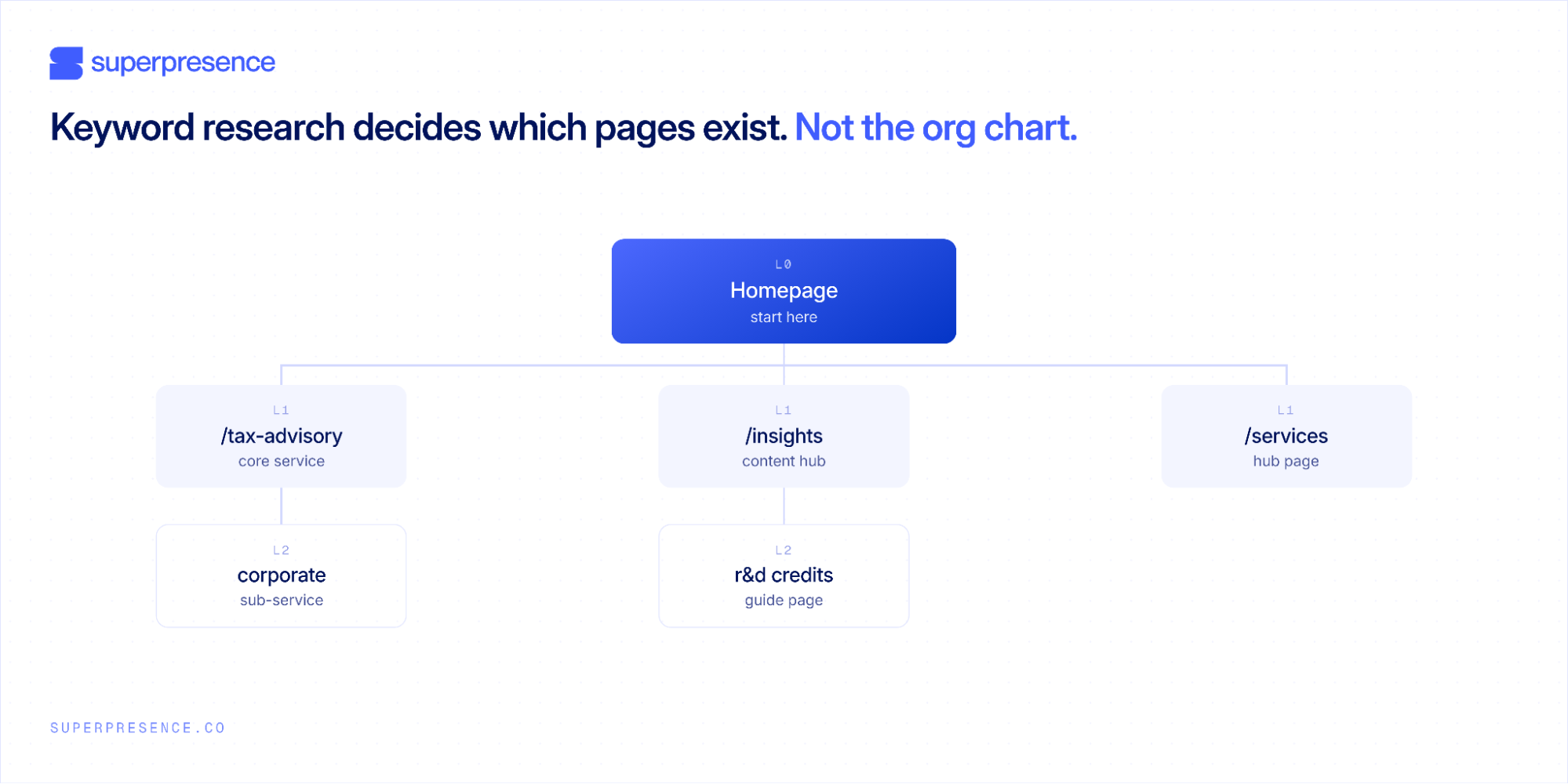
Each row is one page, one target term, one job. None of the three compete for the same search, and the priority column tells the designer where to spend the most attention.
Phase 2: Build for speed and mobile
Once you know what pages you need, the next step is making sure they work well on the devices and connections your visitors use. Speed, mobile layouts, and page structure all need to be considered before development starts.
Design for Core Web Vitals
Core Web Vitals are design decisions as much as engineering ones. The hero video, three custom fonts, and animation library are often what push a premium build out of the green. Google's thresholds for a good experience are specific: LCP ≤ 2.5s, INP ≤ 200ms, and CLS ≤ 0.1.
These scores are based on real visitor data collected through the Chrome UX Report, using the 75th percentile over a 28-day period. A site can look fast in a quick test and still perform poorly for real users.
Some performance decisions belong in the design:
- Media weight: Autoplay hero videos and oversized images can add a lot of page weight
- Fonts: Multiple custom font families can increase loading time before text becomes visible
- Animation: Large animation libraries can add unnecessary JavaScript
- Image sizing: Images should be compressed and sized for how large they actually appear on screen
Other performance issues are mainly handled during development, such as server response time, render-blocking scripts, and unused JavaScript.
Design for mobile
Google uses the mobile version of a site for indexing, so a desktop layout can't simply be shrunk down for smaller screens.
Important content should still be easy to find, buttons should be comfortable to tap, and navigation shouldn't hide pages that matter for users or search engines.
Use headings to structure content
Headings should describe the structure of the page, not just control how text looks.
The H1 should describe the main topic of the page, with H2s and H3s used to break the content into logical sections. Don't choose a heading level just because you prefer the font size or styling.
This matters because both users and search engines use headings to understand what a page is about and how its information is organised.
Test performance properly
Once the site is built, test it rather than assuming the design will perform well. Tools such as Lighthouse and Chrome DevTools can help identify problems with loading, layout shifts, and responsiveness.
Designers can prevent some performance problems before development. Developers still need to diagnose issues such as unused JavaScript, render-blocking CSS, and slow server responses.
Not sure whether your build holds up on real-user data? Request a website review and we'll show you which design and development choices are hurting your Core Web Vitals and what that could be costing you in search.
Phase 3: Design for real content
The design should be built around the content the page actually needs, not placeholder copy. If a page needs more space to answer a search query, the layout should be able to accommodate it.
Make room for content
Placeholder copy often leads to fixed layouts: three short bullets, a two-line hero, or a page designed to fit on one screen. When the real content arrives, there's nowhere for it to go.
Instead, design content blocks that can grow:
- Fixed block: A section designed for a specific amount of copy. Anything longer can break the layout
- Flexible block: A section that expands with the content, allowing for extra paragraphs, proof points, or links
This is especially important for competitive pages. A clean design doesn't have to mean a thin page. The goal is to give the content enough room to answer the questions buyers are searching for.
That doesn't mean every page needs to be long. Some high-trust, referral-led businesses may convert better with less copy. The important thing is to decide how much content the page needs, then make the design flexible enough to support it.
Leave room for internal links
Internal links help visitors and search engines discover related pages. They also help distribute authority across the site.
Don't rely only on navigation and footer links. Templates should leave space for useful links within the content, using natural, descriptive anchor text.
Pages with no meaningful internal links pointing to them can become orphan pages, making them harder for crawlers to discover and understand.
Design for people, not just search
Good UX supports SEO, but good design isn't a ranking factor by itself. Google doesn't simply rank a page because people spend longer on it or bounce less.
What matters more directly includes things like crawlability, relevant content, mobile-friendliness, and Core Web Vitals.
SEO shouldn't dictate every design decision on its own. The structure just needs to work for both search engines and the people using the site, the same balance our web design services are built to hold.
Phase 4: Protect rankings through the redesign
The first three phases only pay off if the SEO work survives the redesign and launch. Most traffic drops after a redesign aren't penalties. They're caused by changes that weren't accounted for: URLs changed without redirects, useful content removed, internal links dropped, or metadata left behind.
Start with a complete URL inventory. Crawl the existing site and capture every URL before anything is deleted or renamed. Then create a 1:1 redirect map so every important old URL points directly to its closest new equivalent. You can't map a URL that has already disappeared.
Content needs the same attention. Some of your best-ranking pages may be old, dense, or visually dated. A web redesign can create pressure to make them shorter and cleaner, but cutting a page from years of useful content down to 150 words can remove the information, internal links, and relevance that helped it rank.
Flag pages that already earn meaningful traffic or backlinks before the redesign starts. Modernise them carefully rather than rebuilding them from scratch.
Removing genuinely thin, outdated, or irrelevant pages can still improve the quality of your traffic. The question is whether you're removing dead weight or cutting something that was already working.
Before launch, here are a few things to check.
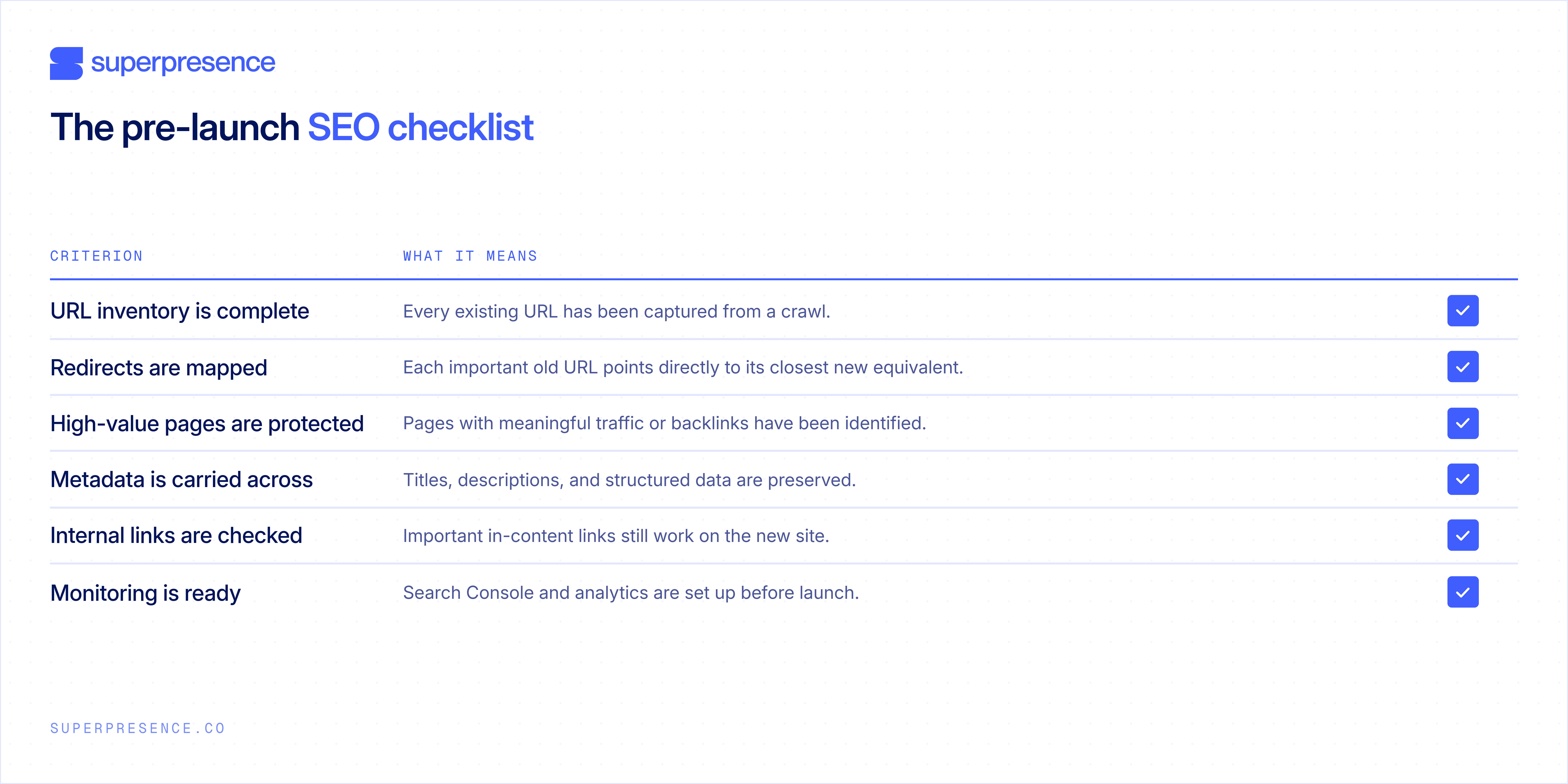
After launch, monitor the migration for at least 90 days. Check indexing and crawl errors first, rankings for priority terms second, then traffic and enquiries.
A small dip in the first few weeks isn't necessarily a problem while Google processes the new structure. A sharp, sustained drop on pages that previously ranked is different. If that happens, check the redirect map, preserved content, and internal links first.
Also check for redirect chains, where one old URL redirects to another URL that redirects again. Each important old URL should point directly to its final destination.
The goal isn't simply to launch a better-looking website. It's to preserve the search value the old site has already earned while giving the new site a better structure to grow from.
Final thoughts
Your site's SEO potential is shaped before launch, while the sitemap is still being planned and the templates are still being designed.
Get the sitemap, templates, performance, content structure, and redirects right, and future SEO has a stronger foundation to work from. Get them wrong, and later SEO has to work around decisions that are already baked into the site.
The principle is simple: make search part of the design process, not a task that gets handed over after launch.
If your site’s already live, the next step is to find out where its current structure is holding it back. Request a website review and we'll show you where the site is costing you rankings and enquiries.
FAQs
Should I sort out SEO before a redesign or fix it after?
Before. Keyword research, sitemap structure, URL conventions, content depth, and template flexibility are much easier to address before the site is built. After launch, SEO is mostly about monitoring, fixing issues, and improving what already exists.
Will a redesign hurt my current rankings?
It can, but most drops come from avoidable problems such as missing redirects, trimmed content, lost internal links, or missing metadata. Build a URL inventory, map redirects, and protect pages that already earn traffic or links.
How long before a new site starts ranking?
There is no fixed timeline. New domains usually take longer than established sites, and competition, content quality, authority, and technical health all affect how quickly rankings develop. Expect meaningful non-branded rankings to take months rather than weeks.
Is Webflow or WordPress better for SEO?
Both can support strong SEO when the site is structured, written, and maintained properly. Webflow SEO is solid if you want cleaner defaults and tighter control over the build without relying heavily on plugins. WordPress offers more flexibility through themes and plugins, but that flexibility also means more opportunities to introduce performance, markup, or maintenance problems.

![Portrait of a Kevin D Chen [Dark]](https://cdn.prod.website-files.com/6963b46b73d13c416619d604/696770db31b454394fd4709a_43e4f0a4b187c1f51dd5024dd9980a60_kevin-photo.avif)