


- Webflow SEO means how well the platform supports search visibility: the markup, hosting, and controls it ships by default, plus the build and content decisions that actually earn rankings.
- For most marketing sites the answer is yes, Webflow is good for SEO. And the reason is the baseline Webflow gives you by default, before any setup or customisation.
- The limits are real, but they matter once you scale up your website: 300 static pages on the Business plan, CMS items tied to bandwidth, and around 1,000 redirects.
- Before you decide whether the CMS is the problem, audit the build: configure the native settings and fix the design choices dragging down performance.
Webflow is better for SEO than most people realize: clean markup, fast hosting, and every on-page control you need, no plugins required. By the end you'll be able to judge whether Webflow's baseline, its ceilings, and its blind spots fit the site you're building.
Webflow vs WordPress SEO, briefly
The ranking ceiling is comparable because both can rank at the top if built well. What differs is the starting point and the upkeep.
Webflow gives you a fast, clean baseline that holds with almost no maintenance. WordPress gives you more control, more content headroom, and a deeper plugin ecosystem, and you pay for it in ongoing upkeep: plugin updates, hosting, theme maintenance.
Why Webflow is good for SEO
Webflow ships the technical SEO baseline by default: clean semantic HTML, native title, meta, canonical, alt-text and robots controls, automatic XML sitemaps, SSL, and global CDN hosting. No plugin layer required.
On performance, that baseline is measurably higher than a typical WordPress stack. 79% of Webflow origins passed all three Core Web Vitals on desktop versus 46% of WordPress origins.
Google’s Core Web Vitals are loading and stability metrics: LCP (the largest contentful paint), INP (input responsiveness), and CLS (layout stability). Here's what the platform hands you.
| Attribute | Webflow | WordPress |
|---|---|---|
| Performance floor | High by default: 79% Core Web Vitals (CWV) pass rate | Depends on host and plugins: 46% pass rate |
| Content scale | Capped by plan and bandwidth | Effectively unlimited |
| On-page control | Strong native fields, fewer automations | Deep, via plugins like Yoast and Rank Math |
| Maintenance burden | Low: managed, no plugin updates | High: plugins, themes, hosting to maintain |
| Tooling ecosystem | Native plus a small third-party layer | Vast plugin ecosystem |
Publishing speed
A steady publishing schedule helps search engines discover new pages faster and builds authority over time. For most marketing teams, speed is bottlenecked less by writing the content and more by waiting in a developer queue to get it live.
Webflow takes engineering out of the daily workflow. Marketers write, edit, and publish straight from the Editor, no developer ticket required.
New posts inherit your default metadata and internal link structure automatically, so moving fast doesn't cost you quality or search visibility.
Clean semantic markup
Webflow outputs structured HTML you control at the element level, which reads more cleanly to a crawler than a theme-plus-page-builder stack layered with wrapper divs. That means less of your ranking potential gets lost to markup a crawler struggles to parse.
On-page controls without a plugin
Title tags, meta descriptions, canonical tags, alt text, and robots settings, all native. CMS collections let you template those fields across hundreds of pages at once. You can launch and manage a large content section without adding a plugin dependency to maintain.
Redirects and URL control
Clean slug editing and native 301 redirect management, no add-on required for the everyday case. Restructuring a site or fixing a broken URL doesn't require pulling in a developer.
Hosting and Core Web Vitals
Managed hosting on Fastly and AWS CloudFront gives Webflow a TTFB (time to first byte, the delay before the server starts responding) of roughly 250–400ms, against 500–2,000ms on typical shared WordPress hosting without a CDN.
Default desktop LCP tends to land under 2.5 seconds, inside Google's "good" band. Core Web Vitals are a Google ranking factor, so this speed advantage feeds rankings directly, not just how the site feels to visitors.
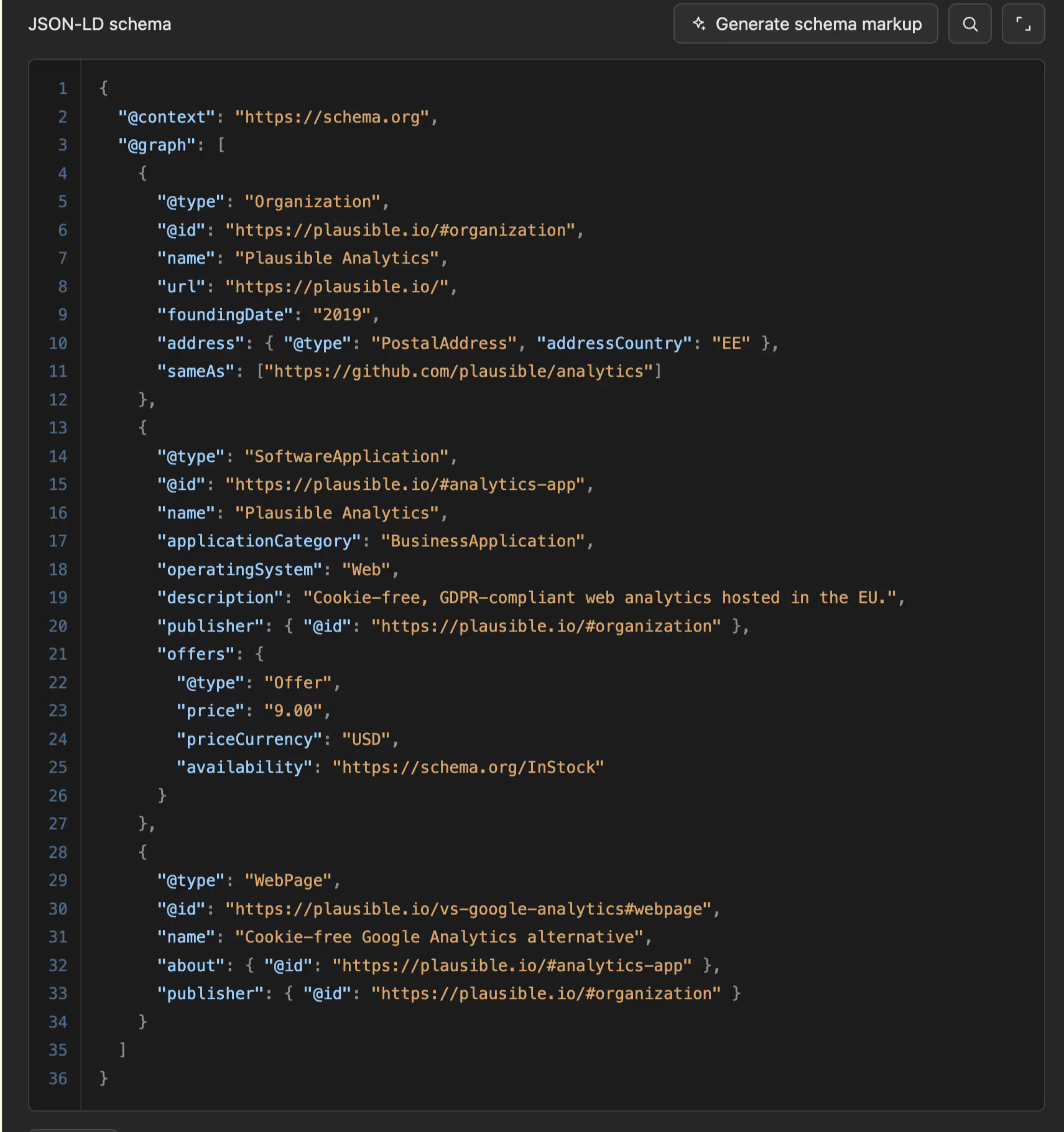
Schema markup automation
Schema markup is possible through custom code embeds and, more recently, AI-assisted generation, though comprehensive coverage is still partly manual. Done well, it's what earns rich results, like star ratings or FAQ snippets, that make a listing stand out in search.
No maintenance debt
There's no plugin layer to update, so the site doesn't slowly degrade or break because a dependency shipped a bad release. Over a few years, that stability is worth more to SEO than it looks on day one: your rankings don't take a hit because a plugin update quietly broke something nobody noticed.
SSL, sitemaps, and Open Graph
HTTPS, XML sitemaps, and responsive design are all on by default, and they're the baseline every SEO checklist starts with. You also get full control over meta descriptions, title tags, canonical tags, and Open Graph tags right in the Editor with no plugin needed.
Add it up and Webflow handles the SEO fundamentals without you having to think about them. The real question is what happens once your site outgrows the fundamentals.
Webflow SEO’s limitations worth knowing
Webflow's real limits are about scale and control, and most marketing sites never hit them. They only become a problem at genuine scale, and there they can be a dealbreaker. Two things cause that: how much content you're publishing, and how many markets you're targeting at once.
Content limits (pages, CMS items, redirects)
The page cap (300 on the Business plan) limits how many pages you can publish, and every page you can't publish is a keyword you can't compete for in search.
The CMS cap ties to bandwidth, an extra 5,000 items per +50GB: run out, and you can't add the location or glossary pages that would otherwise pull in more search traffic.
The redirect recommendation, around 1,000, is the one that actually costs you rankings: redirects carry a URL's ranking and backlink value forward, and past 5,000 of them Webflow's bulk import can time out. This leaves old URLs unredirected and showing up as 404s and dropped rankings.
Sidenote:
The ~1,000 figure for the redirect is a Webflow recommendation, not a hard limit. Nothing breaks at redirect 1,001, but if it does, plan for a dedicated redirect tool from the start rather than fighting Webflow's native system later.
Webflow Localisation’s limits
Webflow's Localisation has two real limits. First, there's no ccTLD strategy or separate domains per market, so you can't use the signal search engines trust most for telling them which country a page is meant for.
And there's no support for complex country-plus-language routing, so if you're selling the same language into multiple countries, like English into Singapore, Hong Kong, and Australia, you can't cleanly separate those markets.
The pages end up competing with each other in search instead of each ranking well in its own market. If you're an Asia-based business hitting either of these, a self-hosted stack still handles complex multi-region SEO better than Webflow does.
Those are the platform's hard limits. The next question is softer: how much of the remaining SEO work can Webflow's own AI tools take off your plate.
What does Webflow's AI and AEO tooling actually do for SEO?
Webflow's AI can generate and fix meta titles, descriptions, alt text, and schema straight from the Audit panel.
Enterprise AEO (answer engine optimization, or visibility inside AI answer engines like ChatGPT) adds agents and analytics for tracking that visibility. It's useful for cleaning up unpopulated fields at scale.
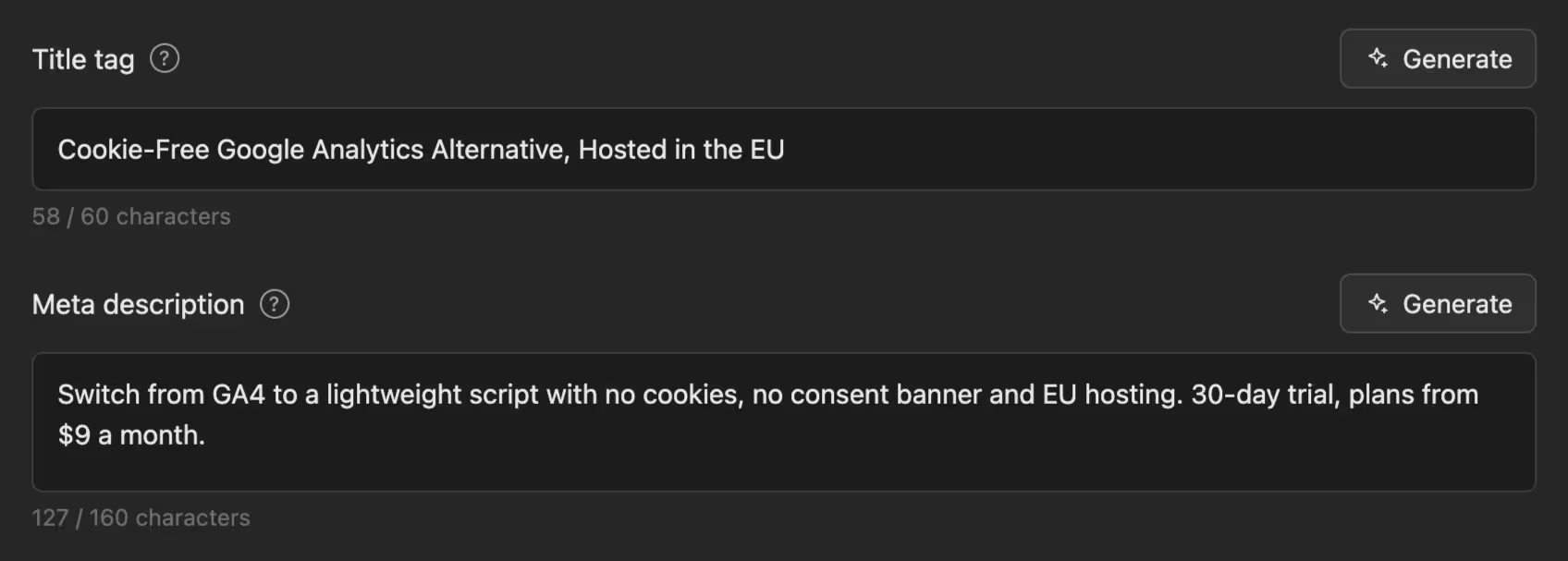
The AI fills fields and flags issues. Authority, links, and topical depth are still on you. Webflow also added llms.txt support, a file that tells AI crawlers how to read your site. It helps at the margins.
Does platform choice affect whether an AI answer engine cites you? Mostly no. Content quality and clean structure drive that, the same things that drive ordinary rankings. SEO in 2026 still runs on the same fundamentals. The surface changed and the fundamentals held.
How to get SEO right on a Webflow build
Get the settings and the structure right before you publish. The platform hands you the controls. Ranking depends on whether you use them and whether the build stays lean. Here's the order that matters.
Set your global metadata defaults
Configure your site title format, default meta description, and Open Graph fields once, so every new page starts from a working baseline instead of blank fields.
Template your CMS collection fields
Build title and description patterns into every CMS collection. Pages then generate accurate metadata automatically instead of shipping empty or duplicated fields.
Confirm your sitemap and robots.txt
Check that the XML sitemap is generating correctly and that robots.txt reflects what you actually want crawled.
Map your redirects before you switch domains
Set up your 301 redirects from the old URLs first, and keep the list lean. A clean redirect map is what keeps rankings intact through a migration.
Connect Search Console
Connect Google Search Console and submit your sitemap so you can track indexing from day one.
What to get right during the build
Focus on getting the structure right. Decide your URL conventions early and keep them shallow and readable. Use one H1 per page and a real heading hierarchy that describes the content instead of just styling it.
Compress images before they go in, and hold back on animation libraries and background video that inflate the DOM and drag down LCP.
The mistakes cluster in the same few places: heavy animation for its own sake, metadata fields left empty across a CMS collection, and heading tags used for looks. Fix those three and you've avoided most of what gets blamed on Webflow.
So should you build on Webflow for SEO?
For most B2B and professional-services marketing sites, Webflow is the right call. Where it stops being the right call comes down to content scale and the level of technical control you need.
Build on Webflow if…
- You're building a marketing site with moderate content volume, well inside Webflow's page and CMS limits
- You publish regularly and want new pages indexed without waiting on a developer
- You're a small team without an in-house SEO or dev specialist to maintain a plugin stack
- You value the fast, clean SEO baseline and the low-maintenance stability that keeps it that way
Don't build on Webflow if…
- You're running a very large or programmatic content library that will blow past the CMS and page limits
- You need server-level control that a managed platform can't give you, like raw traffic logs or custom server rules
- You need a full ccTLD or complex multi-region SEO strategy that goes beyond what Localisation supports
If you're hitting those limits, your content operation is already advanced enough to justify a specialised stack. At that point you've simply outgrown the tier of tools Webflow sits in, and that's a good problem to have.
What outranks the platform choice
The build quality and the content strategy decide the outcome, far more than the CMS you picked. A disciplined build on either platform beats a neglected build on the other. Learn how our Webflow development team delivers that kind of build every time.
Final thoughts
Webflow is good for SEO for most B2B and professional-services marketing sites. It ships fast hosting, clean markup, and every control you need before you touch a plugin.
How far it can take you is comparable to WordPress for the sites most people are actually building. Where it breaks is narrow and knowable: enormous content libraries, server-level control, complex multi-region setups.
The CMS is rarely the reason a site wins or loses in search. So before you migrate, blame, or bet on Webflow, look hard at how your current site is built. That's where the real answer usually is.
If you're not sure whether your build is helping or fighting your SEO, that's the fastest thing to settle. Get a free website review and our Superpresence team will show you what a search crawler and a wary buyer each see.
FAQs
Is Webflow better than WordPress for SEO?
Their ranking ceilings are comparable, and both can rank at the top when built well. The practical difference is upkeep. Webflow starts clean and stays that way with very little maintenance. WordPress offers more control and content headroom, and it needs more ongoing work to keep fast.
Do I need an SEO plugin for Webflow like Yoast or Rank Math?
No. Webflow's native fields cover titles, meta descriptions, canonicals, alt text, sitemaps, and robots without a plugin. You'd only add a third-party app for bulk automation or a scoring UI, and neither of those is a ranking factor.
Will migrating to Webflow hurt my rankings?
Not if the redirects are handled properly. Rankings drop from botched migrations. Webflow itself is rarely the cause. Keep your redirect count under about 1,000, map old URLs carefully, and if you'd rather not risk it, we cover migrating without losing rankings as a service.
How many 301 redirects can Webflow handle?
There's no hard cap, but Webflow recommends staying around 1,000 or fewer. Past that, management and import performance start to strain, which matters most on large migrations.
From Sydney, Australia with a decade in Asia, Kevin built his expertise driving product and growth at tech startups across fintech, logistics, consumer apps, and crypto. He founded SuperPresence with this expertise and passion, helping businesses create high-converting web experiences and digital growth strategies that drive real revenue impact.
Stay ahead of the curve! Subscribe now for expert insights
Hear directly from clients about their journey with Superpresence— our collaboration, expertise, and the results achieved.