7 questions every business owner should ask before a website redesign

Most business owners know when their website isn’t working. What they struggle with is figuring out why, and whether the fix is a full rebuild, targeted improvements, or a different approach to web design services altogether.
A website redesign is one of the bigger investments a founder can make. Done right, it pays back within months. Done wrong, it costs more than the build itself in lost traffic, lost leads, and recovery time that nobody budgeted for.
These seven questions won’t tell you what your new website should look like. They’ll tell you whether you’re ready to build one, and what it actually needs to do when it’s live.
1. Is your site hurting growth or helping it?
Before spending anything on a redesign, you need to know what your current site is actually doing. Most founders have a gut feeling something is off where traffic looks okay, but leads aren’t coming in.
That feeling is worth listening to, but you need data. And three numbers tell you most of what you need to know.
Conversion rate is the most important. For B2B service sites, the industry average sits between 2 and 5%. If you're below 2%, your site is leaving significant revenue on the table.
Bounce rate tells you whether visitors are engaging or leaving immediately. A rate above 70% on key pages usually signals one of two things: an unclear value proposition, or a poor first impression.
Page speed is one of the reasons most founders underestimate. If your website is slow, people tend to leave before they’ve read anything, and Google factors load time into how it ranks your pages.
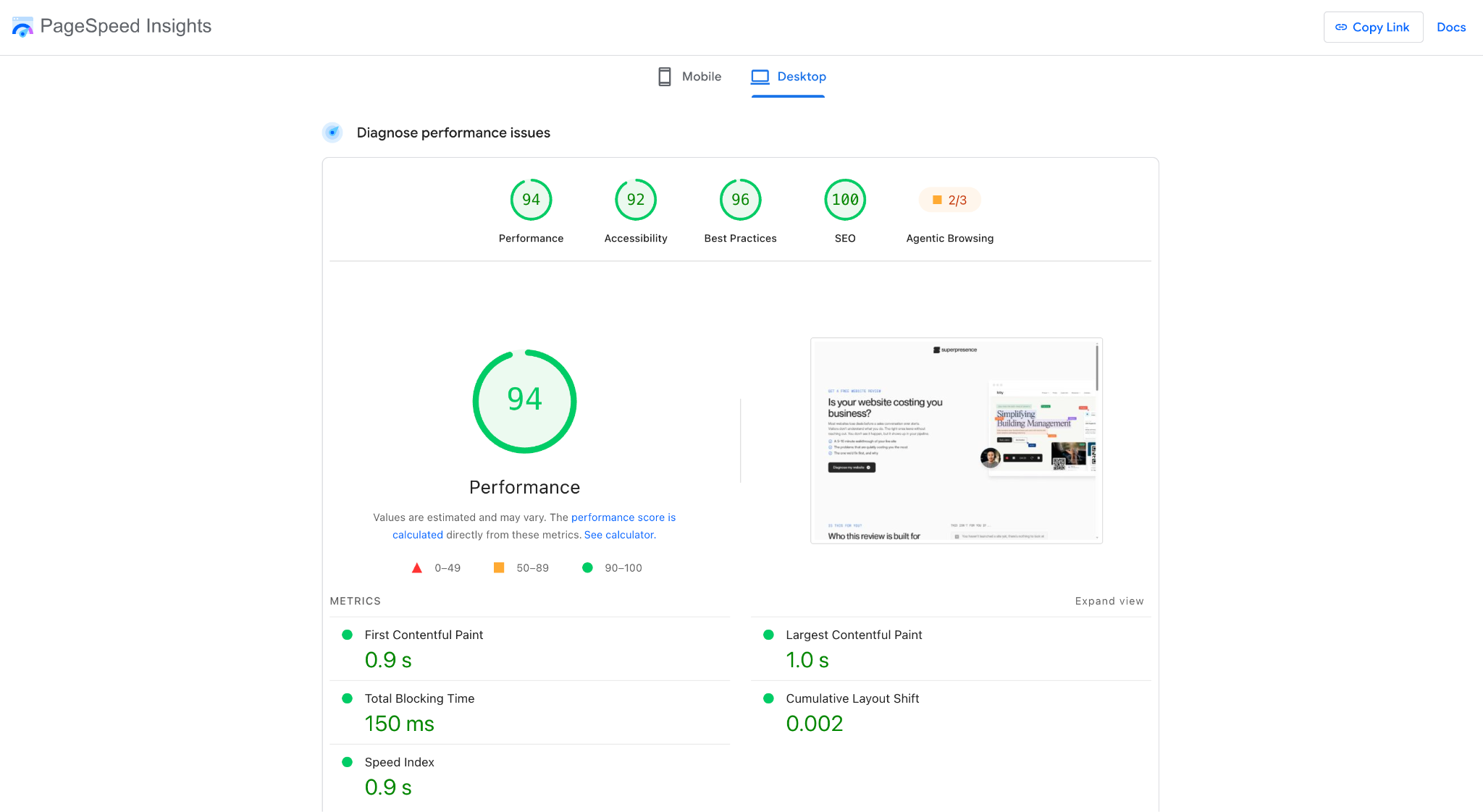
Run your site through PageSpeed Insights. If it scores poorly on two or more Core Web Vitals metrics, speed is costing you customers and organic visibility at the same time.
2. Should you rebuild or iterate for better conversions?
This is the one of the most expensive questions most business founders skip. The common and immediate assumption is that a struggling site needs to be rebuilt from scratch.
However, sometimes a website’s result can be improved through conversion rate optimisation (CRO), a targeted set of improvements that can be done on the existing website.
This would mean improving the design elements such as the headlines, form layouts, and calls to action, without rebuilding the whole site.
Now, the deciding factor is whether your problems are structural or surface-level.
A full rebuild makes sense if:
- Your platform is outdated or requires developer work for every small update.
- Your mobile experience is broken or doesn’t properly adapt to different screen sizes.
- Your Core Web Vitals are failing and the codebase is too bloated to optimise.
- Your brand has changed significantly and the current site no longer reflects it.
CRO, or optimising the site, is the right starting point if:
- Your site is technically sound but underperforming on messaging or layout.
- Visitors are arriving but dropping off at specific points in the funnel.
- You need results faster than a full rebuild would allow.
From my experience, if two or more of the rebuild triggers apply, starting fresh will almost always cost less in the long run than continuing to patch what’s broken.
3. What does the redesign need to deliver to pay off?
Most redesigns are briefed around how the site looks. The ones that actually pay off are briefed around what the site needs to do.
Before talking to any agency, you can define success in numbers. Not “we want a more modern design” or “we want it to feel premium.” Those are outputs. What you need are outcomes: leads generated, conversion rate improved, cost per acquisition reduced.
Here’s what that looks like across different business models:
- B2B SaaS: Increase demo requests by 18% within 6 months post-launch.
- E-commerce: Lift average order value by 12% through better product pages and checkout experience.
- Professional services: Double contact form submissions from organic search.
- VC-backed startups: Reduce bounce rate by 30% to signal product-market fit to investors.
Once you know what success looks like, you can work backwards to see if the investment makes sense. A simple forecasting exercise gets you there fast:
- Current: 50 leads per month at a 2% conversion rate.
- Optimised: 50 leads per month at a 4% conversion rate = 100 leads, same traffic, same ad spend.
Document your baseline metrics before anything starts: traffic, conversion rate, lead volume, cost per acquisition. Without those numbers, it’s harder to prove whether the redesign worked or just looked good.
One thing founders often miss is that a better website amplifies every other channel you’re running and improves its own metrics. Better content structure improves organic rankings. Stronger landing pages lift email campaign performance.
When you account for that multiplier effect, the ROI calculation almost always looks more favourable than it did at first glance. From my experience, this is the part that surprises founders most.
4. Which platform gives you the flexibility you need?
Your CMS choice is one of the most consequential decisions in a redesign, and one of the least discussed. The platform you choose affects how fast your site loads, how well it ranks, how easy it is to update, and how much you’ll spend maintaining it over the next three to five years.
Pick the wrong one and you could be paying a developer every time you need to change a headline.
There are three platforms that cover most use cases for marketing-focused B2B businesses:
At Superpresence, we provide Webflow development for our clients. The reason is simple: it gives businesses more control, speed, and scalability without the complexity.
It also consistently delivers the kind of page speed scores that affect both conversion rates and organic rankings.
That said, the right platform depends on your specific situation. If you're heavily invested in WordPress and your site is structurally sound, a platform migration may not be worth the disruption.
The platform conversation should always start with what your team actually needs to do day-to-day, not what looks most impressive in a demo.
Prioritise speed and editing flexibility first. Those two factors have the most direct impact on your marketing results over time.
5. Does the design process start with strategy or aesthetics?
This is the question most founders don’t think to ask. It’s also the one that separates agencies that build websites from agencies that build websites that work.
The instinct when starting a redesign is to look at references. You pull together sites you like, share them with the agency, and expect something similar to come back. That’s a natural starting point, but it’s also how most redesigns go wrong.
When the process starts with how the site looks rather than what it needs to do, you end up with something visually polished that doesn’t move the needle on the metrics that matter.
A conversion-driven website redesign follows a different sequence:
- Discovery and audit: Understand current performance, identify bottlenecks, document baselines.
- User journey mapping: Define how customers move through the site and what they need at each stage.
- UX architecture: Wireframes and flows built around conversion actions, before any visual design begins.
- Visual design: Brand and aesthetics applied to a structure that already works.
- Development: Built with performance and Core Web Vitals in mind from the start.
- Testing: Validated before full launch, and not patched afterwards.
The key thing to notice is that visual design sits at step four instead of step one. That’s intentional. Design should serve the strategy, and not the other way around.
Oftentimes, the ones who jump straight to mood boards in the first meeting are the ones who'll deliver something that looks great in a portfolio and underperforms in the real world.
If an agency can't clearly articulate their discovery and strategy process before showing you any visuals, that's worth paying attention to.
6. How will your SEO be protected during the migration?
A website redesign is one of the riskiest events for your organic search presence. When SEO isn't built into the migration from the start, avoidable errors like broken redirects, missing metadata, and lost content signals are what cause the damage.
The good news is that it's entirely preventable. Here's what a properly managed migration covers.
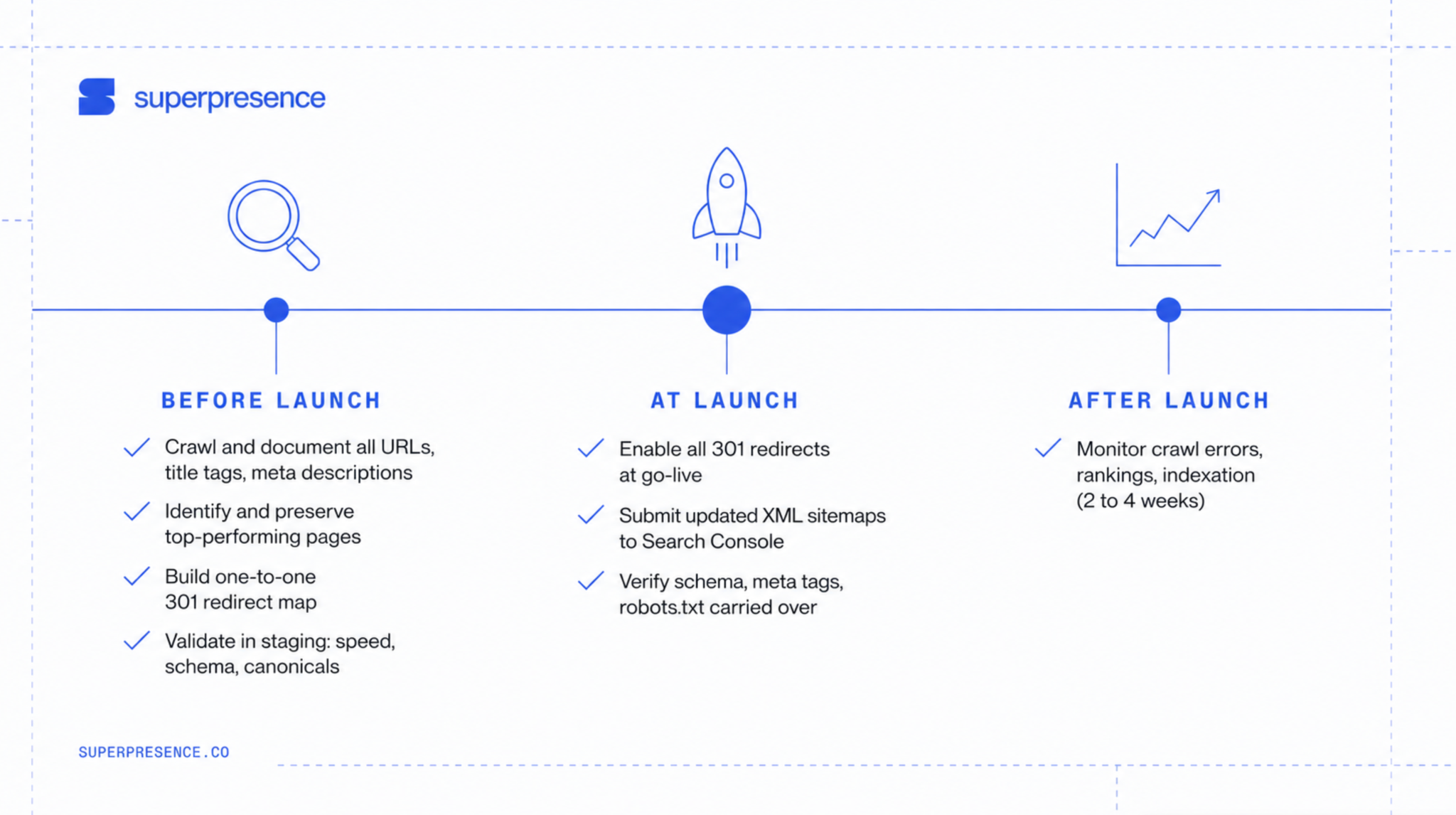
Before launch:
- Crawl and document every active URL, title tag, meta description, and internal link structure. This becomes the map everything else is built from.
- Identify your highest-performing pages and make sure they're preserved with at least the same content depth.
- Create a one-to-one redirect map for every URL that changes. High-value pages should always redirect to their closest relevant equivalent, not a generic fallback.
- Validate everything in a staging environment before go-live, including page speed, schema markup, and canonical tags.
At launch:
- Enable all 301 redirects at the moment the site goes live, not after.
- Submit updated XML sitemaps to Google Search Console immediately.
- Verify that schema markup, meta tags, and robots.txt have all carried over correctly.
After launch:
- Monitor crawl errors, ranking shifts, and indexation changes closely in the first two to four weeks.
One area worth paying specific attention to is AI search visibility. Tools like Google's AI Overviews and Perplexity cite content from sites with clear structure, strong schema markup, and topical authority.
A poorly managed migration can disrupt those signals and make your site invisible to AI-generated answers, not just traditional search results.
And it's not just the big technical decisions that create risk. The detail that trips up most migrations is the blog. Old URLs change, redirects get missed, and months of content equity disappears overnight.
If SEO migration isn't explicitly covered in an agency's proposal, ask about it before signing anything.
7. Who manages the website after launch?
Most founders treat the launch as the finish line, but it's the start of a different kind of work.
The moment your website goes live, it starts generating data about what's working, what isn't, where visitors are dropping off, and what could be improved. Without someone actively interpreting that data and acting on it, most sites stagnate within months of launch.
So before the project ends, define who owns each of these:
- Content updates: Blog posts, case studies, service page changes, new offerings.
- Performance monitoring: Conversion rates, Core Web Vitals, organic traffic, lead volume.
- CRO and testing: Ongoing improvements based on what the data is telling you.
- Analytics: Interpreting the numbers and turning them into decisions.
One thing worth building in from the start is a post-launch review at 30, 60, and 90 days. The first few months after a redesign are when the biggest opportunities to optimise show up. Traffic patterns become clear, form drop-offs get identified, and messaging gaps surface.
The founders who treat launch as the beginning of an optimisation cycle consistently get more from their investment than those who treat it as the end of a project.
Not sure where your website stands?
Answering these questions honestly is the difference between a redesign that pays back in months and one that burns budget without moving the needle.
If you're not sure how your current site scores on the metrics that matter, a free website review from Superpresence gives you a clear picture before you commit to anything.
In a focused 30-minute session, we'll analyse your Core Web Vitals, conversion funnel, and content architecture, then deliver a prioritised action plan showing exactly where your site is costing you and what to fix first.
FAQs
How often should a business redesign its website?
Most businesses redesign every 3-4 years. Fast-moving industries like SaaS and e-commerce often refresh more frequently, every 18–24 months.Businesses in slower-moving sectors can extend to 5 years if performance data supports it.
Will my SEO rankings drop during a redesign?
A properly executed redesign preserves or improves rankings through careful redirect mapping, maintained URL structures, and preserved metadata. You may see a temporary 5-10% dip in the first 2-4 weeks as Google recrawls the site and daily monitoring during this period catches issues early.
Can I keep my existing domain and content?
Your domain stays unchanged throughout the redesign. Our webflow migrate service preseves the best parts of your website and adapt it to the new design, updated where current SEO best practices recommend it.
How do I choose between redesign agencies?
Look for portfolios with measurable outcomes in your industry, fixed-scope pricing rather than open-ended hourly rates, and a process that starts with a strategic audit, not visual mockups.
![Portrait of a Kevin D Chen [Dark]](https://cdn.prod.website-files.com/6963b46b73d13c416619d604/696770db31b454394fd4709a_43e4f0a4b187c1f51dd5024dd9980a60_kevin-photo.avif)