Sales-generating questions you should answer on your website


Key Takeaways:
- 61% of buyers prefer to buy without talking to a salesperson (Gartner, 2025), so your website has to answer their questions before anyone on your team gets the chance.
- Visitors ask five types of question, roughly in this order: credibility, fit, capability, risk and action.
- Clear answers help in AI search too: tools like ChatGPT and Google's AI Overviews get detailed information about your business and can recommend you.
- A price range or a minimum engagement lets a visitor check whether you're in their budget without booking a call.
- Every page has to give the same answers. A homepage that names one audience and service pages that name another will lose the visitor.
What happens when your website doesn't answer a question
When your website doesn't answer a visitor's question, the visitor usually doesn't contact you to ask it. They leave, so you never find out they were there.
When we review a site as a web design agency, this is the first thing we check: whether a visitor can find these answers without contacting you.
This matters more than it used to, because buyers now do most of their checking on their own. Gartner's 2025 sales survey found that 61% of buyers prefer to buy without talking to a sales rep. Your website is usually the first place buyers check you, before any sales conversation starts.
The five types of question your website should answer
Visitors' questions fall into five types: credibility, fit, capability, risk and action. They tend to arrive in that order, and a visitor rarely moves on to the next type while the current one is still unanswered.
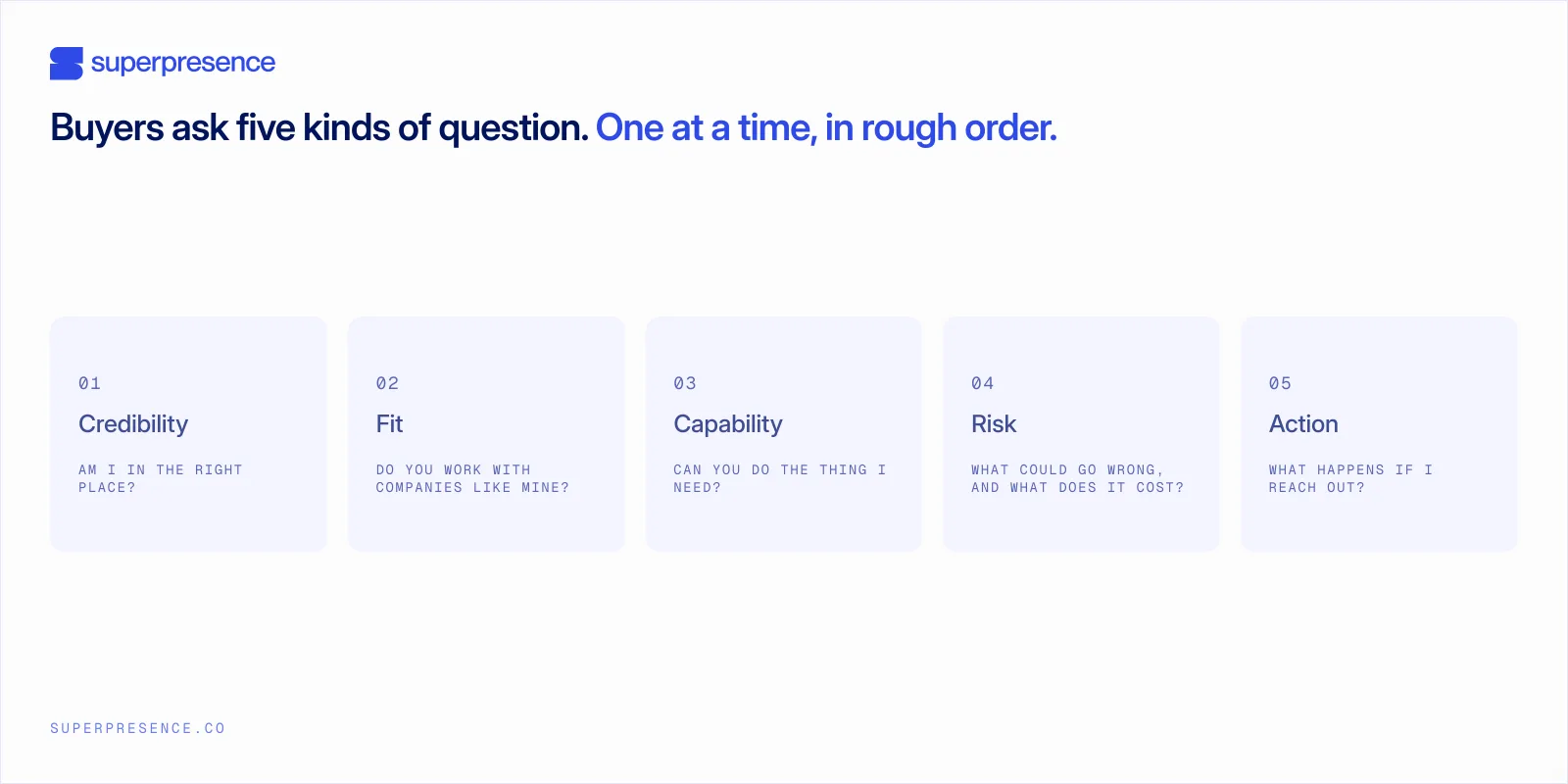
The order isn't strict, because a visitor might go back to pricing after seeing your case studies, or back to your team page after reading about your process.
So the aim is to answer every question you can predict on the page, and to keep the sales conversation for the ones that depend on the visitor's situation.
Sidenote:
Some questions still need a person. Only a conversation can tell a visitor whether your service fits their specific situation. The website's job is to bring them to that conversation with the basic questions already answered.
Credibility: have you done this before?
Credibility questions come first, because a visitor wants proof that you've done this kind of work before they read any further.
Have you done this for companies like ours?
Show named clients, the results you got for them, and case studies that start with the client's problem. A row of logos on its own gives the visitor nothing to check.
A manufacturing supplier that writes "cut lead times for a food packaging company from six weeks to three" gives a visitor in a similar business a result to compare with their own.
Do you work with companies our size?
Give visitors enough detail to place themselves: a size range, a minimum engagement or a description of a typical client. "We work with businesses of all sizes" works against you. Small companies read it as a sign of high prices, and large companies doubt you can handle their volume of work.
An accounting firm that says "for companies with 10 to 100 staff" lets a visitor decide in one line whether to keep reading.
Do you know our industry?
Visitors want to know whether you understand their customers and how their industry works. The strongest proof is a page for each industry you serve, the next best is case studies from that industry, and the minimum is a named list of industries.
If a law firm lists property development, hospitality and technology clients, a hotel group can see it has handled their kind of contracts before. Only list industries where you can point to real work, because a visitor from that industry will look for it.
Fit: is this for me?
Once a visitor believes you've done this kind of work before, they check whether you're the right match for them: who you serve, what you sell and where you work.
Who is this for?
Your homepage should name the customer you serve in its first screen, in plain words, even if that means some visitors see they're not a match.
For example, a clinic that says "physiotherapy for office workers with back and neck pain" tells the right patients they've found the right clinic. "Health and wellness for everyone" is too generic and doesn't explain your business.
You may get fewer enquiries this way, but more of them will come from people you can actually help. If you serve several types of customer, give each one its own page. Separate pages also give search engines one clear page to rank for each search, which is part of SEO web design.
What do you actually do?
State your service and the result it produces, in words a visitor doesn't have to translate.
Take a SaaS company that describes itself as "helping teams reach their potential". The visitor still doesn't know what it sells. "Software that tracks staff leave and runs payroll for companies of 20 to 200 people" says what it sells, who it's for and what the customer gets.
Do you work in our region?
Visitors from other countries look for the countries or cities you serve and how you handle time zones and language.
A Singapore consulting firm with clients in Sydney, for example, can state which of its working hours overlap with Australian business hours. That answers the question a Sydney visitor is asking before they get in touch.
Put this on your service pages, because a visitor checking whether you work in their country won't find it in a line about "global clients" in the footer.
Capability: do you have the resources we need?
Past work shows you can do the job, but the visitor also needs to know you can take on theirs now. Capability questions ask whether you have the people, the process and the tools for it.
What's included?
Write down what your price covers and what it doesn't, so the visitor can compare you with other suppliers on the same terms. Without that list, two quotes that look similar can cover very different amounts of work.
For example, an accounting firm offering outsourced bookkeeping might list:
| Included | Usually excluded |
|---|---|
| Monthly bookkeeping and reconciliation | Tax filing and audits |
| Payroll processing | Back-dated catch-up work |
| Monthly management report | Software subscription fees |
| Year-end accounts preparation | Advisory and CFO-level meetings |
| Onboarding and system setup | Extra entities or currencies |
The cheapest quote a visitor receives often covers the least, and a list like this lets them see that before they compare prices.
Who will do the work?
Visitors want to know how big your team is, what each role does, and who will do the work day to day. A common fear is that the founder pitches, the contract gets signed, and the work is handed to people the client never met.
Name your senior people and what they're responsible for on your homepage or service pages, so that fear is answered before it comes up.
What does the process look like?
Describe the phases, a rough timeline, who the client talks to, and how decisions and delays are handled. Visitors read this to picture what working with you looks like week to week.
We publish our own web design process stage by stage for the same reason.
What tools and systems do you work with?
If your visitors depend on specific software, standards or certifications, name them. A SaaS company can list the tools it connects to, such as Xero, HubSpot and Slack. A manufacturer can state its certifications and the file formats it accepts.
Some visitors won't book a call until they know you fit into the systems they already use.
Can I see the work?
Show case studies that explain the starting problem, the decision you made and the result. Polished photos show what the finished work looks like, but only the decision shows the visitor how you think, which is what they're trying to judge.
Risk: what could go wrong?
Risk questions are the ones visitors are least likely to ask on a call. That makes them the questions your website most needs to answer.
How much does it cost?
Visitors don't expect an exact quote on your website. They want to know whether it's worth getting in touch, which is why we publish our own price ranges by scope in our breakdown of website cost.
Demand Gen Report's 2024 buyer survey found that 86% of buyers rank pricing as a top factor when they evaluate suppliers.
If you can't quote before you understand the job, publish a starting point instead: a price range, a minimum engagement or an explanation of how you price. A published range will cut some enquiries, and most of those come from people who wouldn't have bought at that price.
What happens if it doesn't work out?
Visitors want to know the contract length, the notice period and what they keep if they leave, such as their data, files and accounts. A SaaS company, for example, can state that customers can export all their data at any time.
Answering this before anyone asks shows the visitor you've handled the end of a working relationship before.
Action: what happens if I get in touch?
After credibility, fit, capability and risk, the visitor has one question left: what happens after they get in touch? A contact page that only says "Get in touch" leaves it unanswered.
What happens after I submit the form?
Your contact page should say who replies, how fast, what the first call covers and whether it ends with a proposal.
A page that only says "Get in touch" asks the visitor to trust a process they can't see. Even someone who has already shortlisted you may put off contacting you. Four things belong on every contact page:
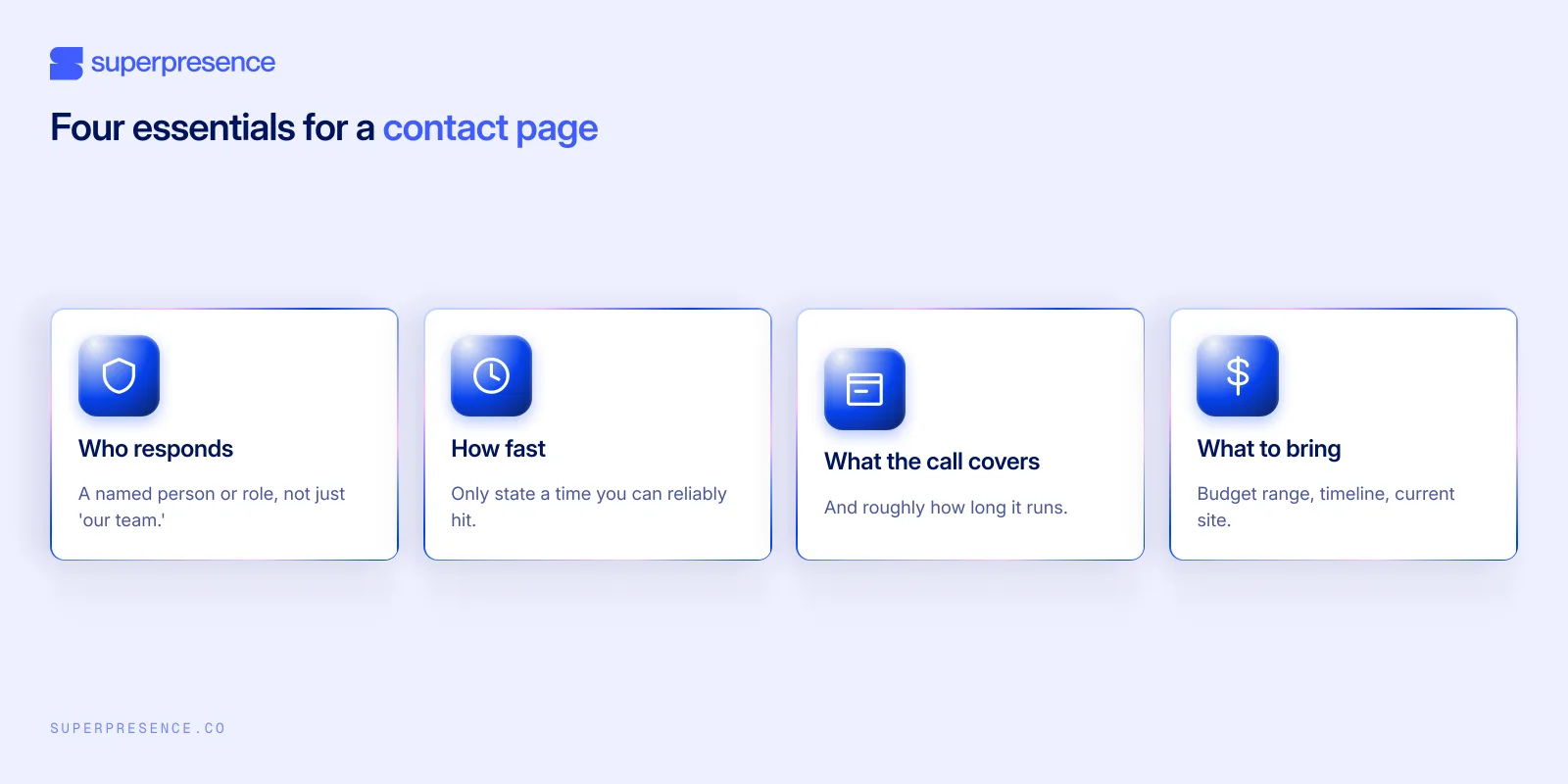
Only publish a response time you can reliably meet.
Is there a smaller first step?
Match your call to action to how ready the visitor is. Someone reading your service page for the first time may not be ready to book a call.
Offer them something smaller: a checklist, a calculator such as our website ROI calculator, or a question answered by email. Visitors who aren't ready for a meeting will often take a smaller step, so you hear from them sooner.
What does a proposal include?
Describe your proposal before the visitor has to ask for one. Say what's in it (the scope, a price range and a timeline), how it arrives (a document, a call or both), how long it takes and whether it's free.
It takes a few lines to write, and it removes one more reason for the visitor to wait.
A clear website also helps you show up in AI search
When your pages answer the questions buyers ask, AI tools such as ChatGPT, Perplexity and Google's AI Overviews get clear, detailed information about your business. These tools read websites to answer buyers' questions, so they can then describe you accurately and recommend you to the right buyers.
For example, in October 2026 we asked Google for a "physio clinic in Sydney for office workers back pain". Its AI Overview described one clinic as offering neck and back pain treatment and workplace ergonomic desk assessments. Both details come from the clinic's own services page.
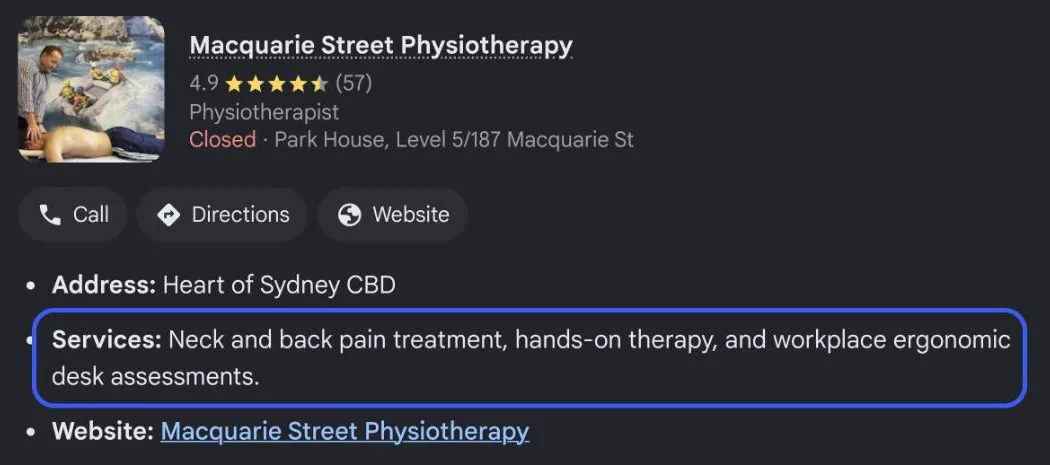
Google's AI Overview for "physio clinic in Sydney for office workers back pain", searched from Australia on 9 October 2026.

The same details on the clinic's own services page, which Google's answer links to, captured on 9 October 2026.
That can bring you more visitors from AI search. Google's guide to AI features, checked in October 2026, says AI Overviews link to the websites behind each answer. It also says people who click through from them tend to spend more time on the site.
You don't need special files or code for this, according to the same guide. Writing clear answers for your visitors is the core of generative engine optimisation (GEO), so the same work helps you with both your visitors and AI search.
Check your website against the five question types
Go through your site one question type at a time: credibility, fit, capability, risk and action. Check that each answer sits on the page where visitors and AI tools will look for it. Then check that your homepage, service pages and sales conversations all give the same answer.
If you'd like us to run that check for you, send us your URL for a free website review. We'll tell you which of the five question types your site leaves unanswered and where the answers should go.
FAQs
Won't publishing our prices lose us leads?
You may get fewer enquiries, but you'll spend less time on calls about budget. Visitors who contact you after seeing a range already know you're within their budget, so the first call can start with the job itself. If your prices vary a lot by job, publish a minimum engagement instead of a range.
Do we have to answer all of these on the homepage?
No, because answering everything on the homepage makes it too long to read. Answer credibility and fit on the homepage, capability on your service pages, risk on your pricing and FAQ pages, and action on your contact page and every call to action. Then link from each answer to the page with more detail.
How specific should we be about the industries we serve?
Be specific enough that a visitor from one of those industries recognises their own business, and only list industries where you can show a named example of your work. If you can't point to work in an industry, leave it off, because a visitor from that industry will look for proof and won't find it.
Our work is custom. How do we describe our scope without over-promising?
Describe the usual shape of a project, and leave the exact details for later. List the usual phases, what's included and excluded, and what makes the price go up or down. Visitors reading a service page are comparing suppliers, so they need enough to compare you, and the exact scope can wait for the proposal.
What if we can't commit to a response time on the contact page?
Then don't publish one. Publish what you can deliver every time instead: who reads the form, what the first conversation covers and what the visitor should bring to it. The visitor still learns what to expect, and you only make promises you keep.


![Portrait of a Kevin D Chen [Dark]](https://cdn.prod.website-files.com/6963b46b73d13c416619d604/696770db31b454394fd4709a_43e4f0a4b187c1f51dd5024dd9980a60_kevin-photo.avif)