How to choose a web design agency: Checklist, questions and scorecard


Choosing a web design agency takes more than liking its portfolio or comparing quotes. You need a team that fits your project, protects what your current site has built, and explains the costs and support you’ll need after launch.
This 8-step guide shows you how to choose a web design agency with 10 questions to ask on discovery calls and a scorecard template to compare finalists using evidence.
Who this is for: This guide is written for software as a service (SaaS) and tech businesses. But the steps also apply to any business comparing web design agencies.
8 steps in choosing a web design agency
- Define your website needs
- Choose the right type of agency
- Set a realistic budget
- Review its work and process
- Ask 10 questions on the discovery call
- Spot warning signs
- Plan for post-launch costs
- Score and compare your finalists
1. Define your project needs
Before looking at anyone’s portfolio, first define what you need from a web design service. Everything an agency quotes is built on what you tell them.
That’s why at Superpresence, before each discovery call, we always ask our clients for their brief, or what we also call website strategy.
Here’s what designers expect from a brief.
- Goal: What should visitors do? To generate more enquiries, share your lead generation strategy and any lead magnets, such as a guide, template, trial, or demo, so the agency can plan their placement and delivery.
- Audience: Who the site serves and what they need to know before choosing you.
- Pages and content: What pages you need, what content already exists, and who will write and add anything new.
- What must stay: Important pages, traffic, connected tools, and brand materials.
- Budget: Your range and what it covers.
- Timeline: When you plan to choose an agency and launch.
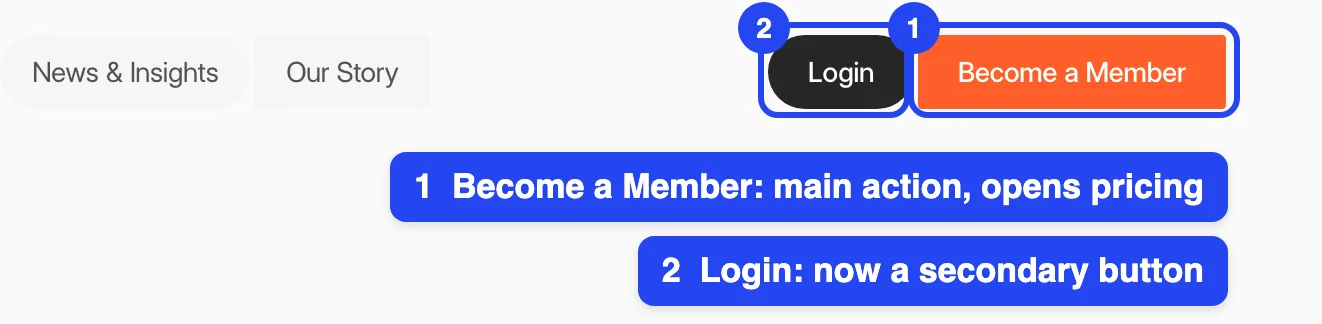
For example, when we redesigned the website for the Bangkok Startup Association, we first asked which action mattered most and on which page. Their answer was membership sign-ups on the pricing page, so that page became one of the starting points for the redesign.

On the old site, the main action in the navbar was "Log In". We applied website navigation best practices and changed it to "Become a Member", which links to the pricing page, with "Login" as a secondary action.
A clear brief gives agencies the detail they need to price the work accurately and helps reduce unexpected costs from added work.
It also narrows your options. Once you know what kind of website you need, you can look for an agency with the right experience.
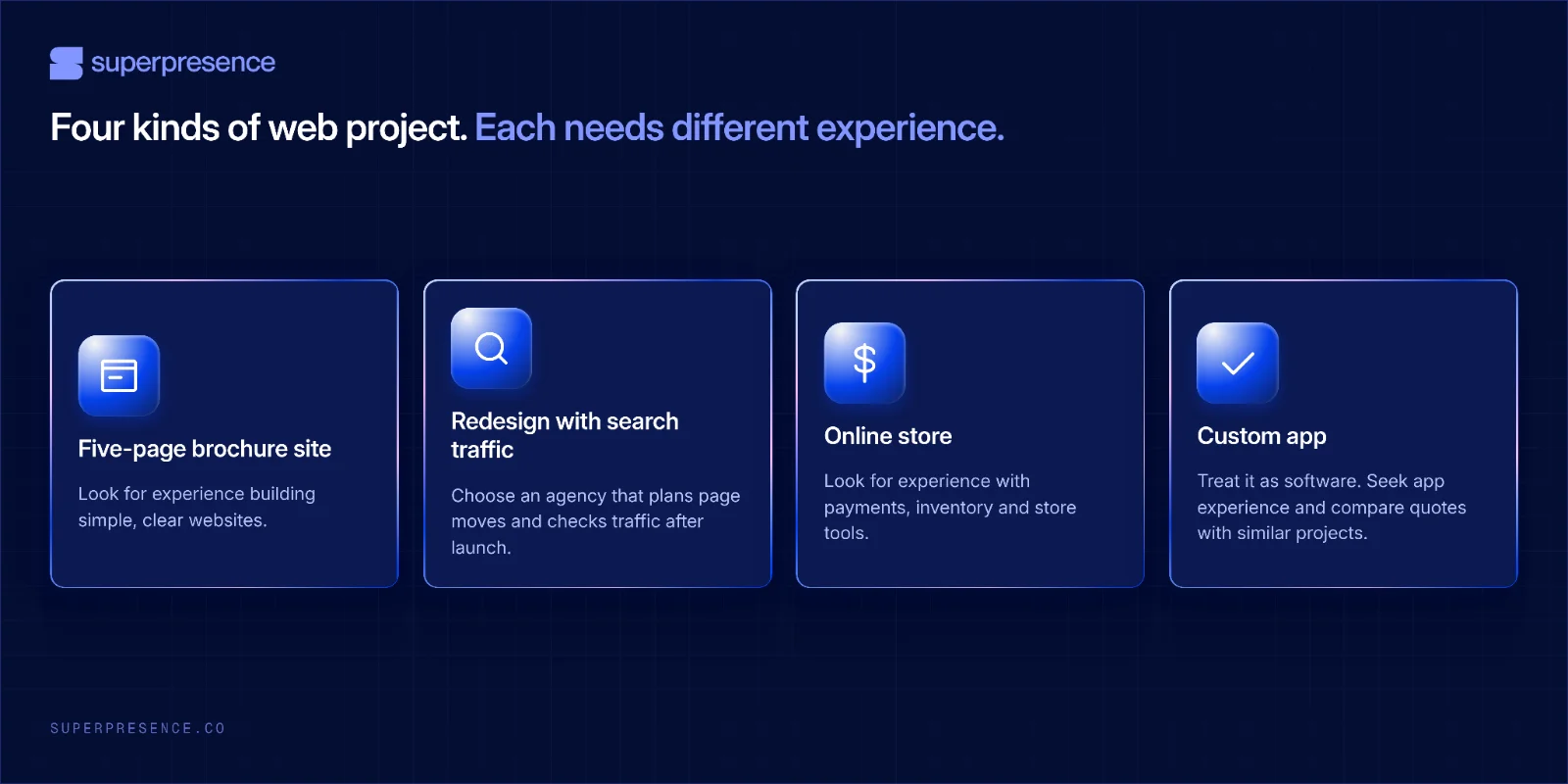
Think of it like hiring a builder. A bathroom remodel and a new apartment building need different skills and teams. A simple brochure site and a custom app do too.
Your project may be one of these:
2. Choose an agency type that fits your project
Match the provider’s skills and capacity to the work. A freelancer may suit a small, well-defined project. A larger build may need several specialists and a clear project lead.
Below is how each model suits some projects better than others.
3. Expect to pay $2,000 to $8,000+ for a typical business website
In its September 2026 guide, Upwork estimates that a professionally built business website costs $2,000 to $8,000+. An online shop typically costs $5,000 to $15,000+. All prices here are in USD.
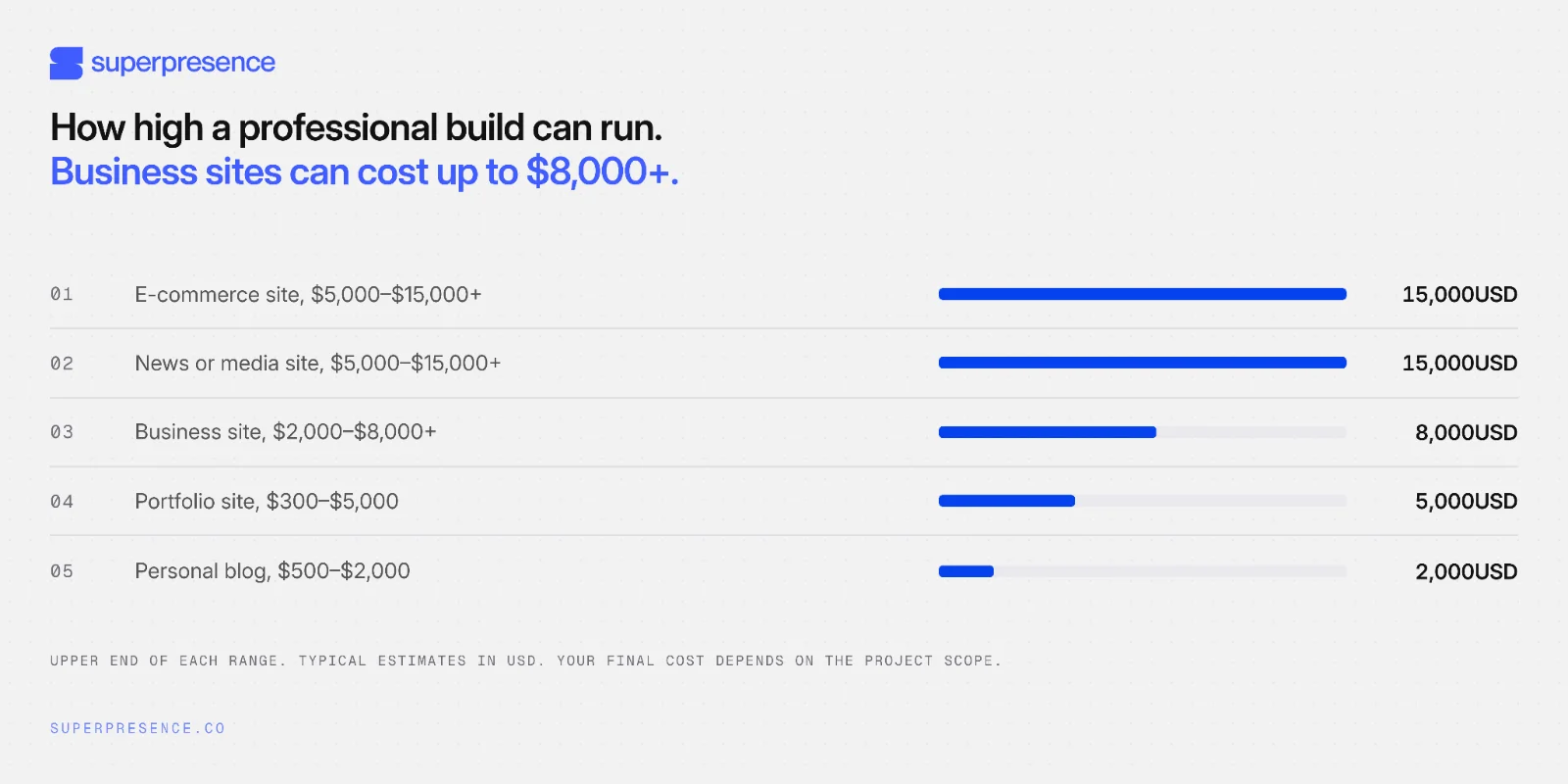
These are broad estimates. Your project’s cost depends on what the site needs.
Several factors affect the price:
- Domain and hosting: Every site needs a domain and a place to run. Hosting costs depend on the site’s needs.
- Platform: Website builders and platforms may charge monthly or annual fees. Extra features can add to the cost.
- Features and complexity: More pages, custom design, online payments, and connected tools mean more work.
- Maintenance: Updates, security checks, and backups add ongoing costs. Upwork estimates maintenance and security at $50-$200 per month.
The table below compares typical prices by provider type and project scope. Use it as a starting point, then compare quotes for the same work.
Check what each quote includes
Quotes may cover different work. Ask each agency whether its price includes:
- Copywriting and adding content
- A map of old pages and their new links
- Website analytics setup
- Accessibility checks
- Handover training to internal team
- Licences for paid plugins, fonts, and stock images
- Post-launch fixes and support, including how long support lasts
Use our website ROI calculator to estimate what your site needs to return. Then compare quotes for the same work. Differences in what’s included often explain the price gap.
4. Review the agency’s work, process and technical skills
A portfolio helps you judge an agency’s visual work. Their process and platform choices help you see through their technical depth. For a business website, you need both.
Review case studies and live sites
Case studies explain the thinking behind the work. They explain the client’s problem, what the agency did, and what changed as a result. Review both, then ask how closely the examples match your project.
Live sites show how the work performs. They show whether pages load smoothly, work on phones, and help visitors complete key tasks.
Simple ways to test:
- Open the site on your phone. Check that text is easy to read, buttons are easy to tap, and pages fit the screen.
- Try the main task. Request a quote, book a call, or make a purchase. Notice any confusing steps or broken forms.
- Find key information. Use the menu and links to see whether you can quickly find what you need.
- Check how quickly pages appear. Notice if you’re left waiting, especially when opening important pages or images.
If you’re in healthcare, finance or law, where specific rules or trust expectations apply, ask how the agency has handled them.
5. Ask 10 questions on the discovery call
The discovery call is where everything so far becomes evidence about one agency. Ask for clear examples, live demonstrations, and get clear on what working together may look like after launch.

Before the calls: Decide which criteria matter most to your business and set their weights in the scorecard. Keep those priorities fixed while you compare agencies.
#1 What would you change about our brief?
Look for specific suggestions tied to your goals, audience or scope. “It all looks great” may mean the agency hasn’t tested your assumptions.
#2 Walk me through your process from brief to launch.
A clear answer names each stage from discovery to launch. Confirm when you’ll review the work and what needs your approval before the project moves forward.
Ask to see a working preview of the site before launch. Mockups alone won’t show how the finished site works.
Ask how the agency will set out the included changes and the cost and timeline for extra requests in its proposal or contract. That way, you’ll know what to check when you compare proposals.
#3 Who will work on the project, and what will each person do?
Ask who will lead the work, shape the design and build the site. Some agencies cover both web design and web development. Others focus on one.
Look for named roles and experience, plus a clear plan for checking that the finished site works as intended.
#4 Our current site gets search traffic. How will you protect it during the redesign?
If the redesign changes page URLs, ask how the agency will map old pages to new ones, set up and test redirects, and monitor search traffic after launch. Ideally, high-traffic pages will keep their current URLs. If a URL must change, plan its redirect before launch.
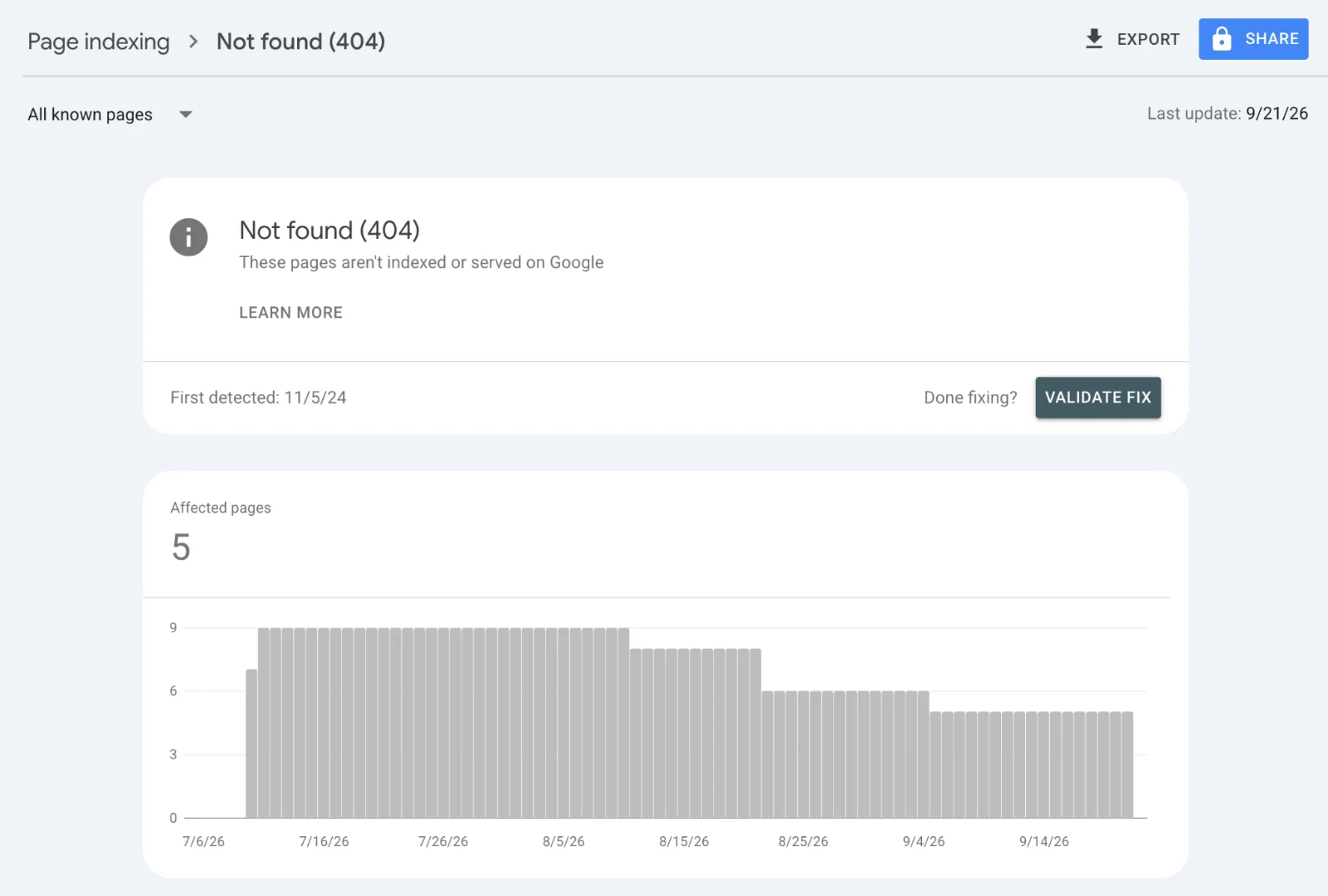
After launch, check Google Search Console for missing pages and indexing issues, and monitor search traffic to catch problems early. Google recommends planning redirects and monitoring traffic during a site move.
#5 Why do you recommend this platform for us, and what does the build include?
Ask how the platform fits your goals, budget and the people who will manage the site. Then confirm what the build covers:
- Pages and content: Which pages will the agency build, such as service pages, articles or team profiles?
- Updates: What can your team change or publish after launch?
- Forms and tools: Which will the site connect to, and how will the agency test them?
- Plans and add-ons: Which plan or paid extras will you need, what will they cost, and who will manage them?
If accessibility matters for your project, ask which Web Content Accessibility Guidelines (WCAG) 2.2 conformance level (A, AA or AAA) the agency will target. Also ask how it will test the site and whether fixes are included. Requirements vary by market and business.
▶️ We often recommend Webflow development services because your team can update the site, add pages as the business grows, and spend less time on upkeep. It may not suit every project, so check that it fits your site’s needs.
#6 Who will control our domain and website accounts?
Your business should keep control. The agency can use its own access to do the work. Clarify:
- Domain: Will it be registered to your business, so your team can renew or transfer it?
- Website and hosting: Will someone on your team have administrator access? If the agency manages hosting, how could you move the site?
- Website data: Will your team have access to visitor reports, Google Search Console and submitted enquiries?
- Content and files: Which text, images, design files and build files will your business own or receive? Can any paid licences be transferred?
If an agency says it will “handle everything”, ask who controls each account and how your team can access or move it. Check that the proposal spells out ownership and access. Question 10 covers handover if you part ways.
#7 What support do you provide after launch?
Ask how long support lasts, what fixes are covered, and whether training and handover are included. A vague answer leaves you unsure what happens when the site goes live.
Get support terms in writing. Check what the monthly plan includes, how quickly the agency responds to routine and urgent issues, and whether emergency or out-of-hours help costs extra. Confirm what happens to your accounts and licences if you leave.
#8 Which of our requests would you push back on?
A thoughtful agency can name a request and explain how it might affect your goals, budget or timeline.
“We can do everything” may mean the agency isn’t weighing the trade-offs.
Pay attention to the questions the agency asks you, too. If it only takes your page list and sends a quote, it may be pricing the brief without testing it.
#9 Show us how we’d make a change to the site after launch.
Ask the agency to demonstrate how someone on your team could add a page, change the menu, publish a campaign page or update a team member. A live or sample-site demonstration gives your team a clear picture of the workflow and how the platform operates.
#10 If we part ways in two years, what would a handover look like?
Ask the agency to explain what your business would keep, what it would need to provide, and how long the handover would take.
Make sure the proposal or contract covers:
- What your business owns: the written content, designs and files used to build the site, and when ownership transfers.
- What you can keep using: any paid fonts, images, tools or licences, including whether they can be transferred and what they’ll cost.
- What access and data you’ll receive: administrator access to the site and accounts, plus visitor reports and form enquiries.
- What the agency must provide when work ends: the files and information needed to continue, when they’ll be provided, and whether handover support costs extra.
Ask for clear terms rather than relying on a general promise to “hand everything over”.
6. Spot warning signs before you decide
Compare each quote with your brief. Follow up on gaps, and walk away if an agency won’t give you a clear answer before you commit.
Clarify before you decide
Ask the agency to explain these points and update the quote if needed:
- Post-launch costs are vague. Ask what support, fixes, training and ongoing fees are included.
- You can’t review a working site before launch. Ask when and how you’ll preview and test it.
- “SEO-ready” is just a label. Ask what work it covers, especially if page URLs will change.
- Every request gets a yes. Ask what the agency would recommend leaving out or changing to meet your budget and timeline.
- The quote has no assumptions or exclusions. Ask what could change the price, and whether copy, migration, tool connections, training and paid licences are included.
- The agency proposes a custom or closed platform. Ask what it costs to maintain and how you could update or move the site. If there’s no clear exit route, treat that as a dealbreaker.
“We’ve done this before” should come with relevant work you can check or a reference you can contact. If an agency promises results, ask what it means, how it will measure them and what it can actually commit to.
Dealbreakers
Walk away if the agency:
- Won’t confirm that your business will control its domain and key accounts, or explain how you could access or move them.
- Can’t explain how it will protect existing search traffic if the redesign changes page URLs.
- Won’t explain its platform or build choices in plain language.
- Can’t show any relevant work you can verify, such as live sites, case studies or a reference.
- Guarantees a specific Google ranking. Google says no one can guarantee a #1 ranking.
- Won’t define what the quote includes, excludes and costs.
7. Estimate support and running costs after launch
The build quote is only part of the cost. Ask each shortlisted agency for a three-year estimate that separates the one-off build fee from monthly and yearly costs. Have them state what the estimate assumes, including the platform, paid tools, support and number of email accounts.
Compare the full cost of running each site.
- Website plan and hosting: Which plan does the site need, what does it include, and what will renewal cost?
- Domain and business email: What are the yearly domain renewal and per-user email costs? Who holds the accounts?
- Paid tools and licences: Are forms, analytics, images, fonts or other paid services needed? What do they cost to renew, and can they transfer if you change providers?
- Maintenance and support: What routine updates, backups, fixes and content changes are included? What will extra work cost, and how is it billed?
We checked published prices for Webflow plans, a .com domain, and Google Workspace, then added Upwork’s maintenance estimate of $50 to $200 a month. The table below brings these together as rough annual estimates of about $342 a year for the basics, or about $1,842 with maintenance.

However, these are only examples, not like-for-like averages. Compare each agency’s estimate over the same period, with the same inclusions and exclusions. Also check whether prices are before tax and whether renewal rates or fees can change.
8. Compare finalists with the scorecard
Score every agency against the same criteria, weighted by what matters most to your business. Compare their strengths, gaps and trade-offs side by side to see which one best fits your goals and budget and why.
Download your web design agency scorecard here.
How to use the scorecard:
- Score each criterion from 1 to 5. Use evidence you can point to, such as an answer, a live demonstration, a contract or a reference you contacted.
- If you can’t verify something, score it low and note what’s missing. Don’t give it a middle score, because that can hide an unanswered question.
Scorecard criteria and suggested weights
Use these weights as a starting point. Adjust them to match your project before the discovery calls. The weights should add up to 100%.
Calculate each agency’s score: Divide each rating by 5, multiply it by the criterion’s weight, then add the points. For example, a 4 on a 20% criterion earns 16 points.
Our scorecard template does the maths for you and gives you space to note the evidence behind each decision.
A worked example
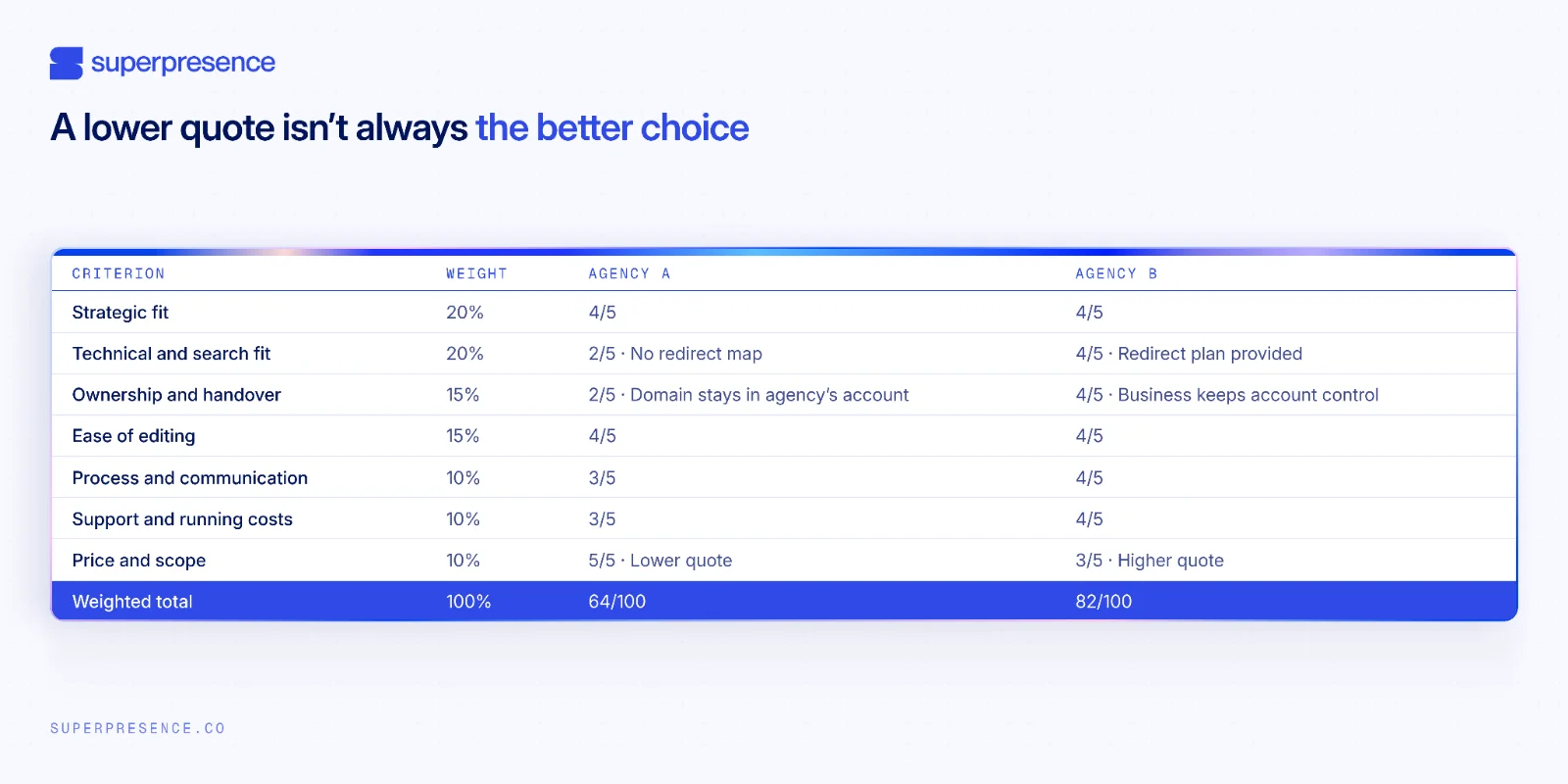
Take two illustrative finalists. Agency A quotes lower, but its proposal has no redirect map and the domain stays in the agency's account. It scores 2 on technical and search fit and 2 on ownership and handover.
Agency B costs more, arrives with a redirect plan and delegated-access terms, and scores 4 on both rows. B wins, and the price row can’t save A.
Choose the agency that plans beyond launch
A website project doesn’t end when the site goes live. You’re choosing how it will be updated, supported and handed over in the years after launch.
Compare what each agency can show you: a migration plan, clear account ownership, written support terms and the full running costs. Then use your scorecard to weigh the evidence against your priorities. Don’t focus on just the build price.
Get a free website review
Before you brief agencies, get a clearer view of where your landing pages and site structure could improve. Our free website review provides an optimisation roadmap, delivered within a week.
Submit your website URL to see if your site is a fit. If accepted, we’ll send you a recording and written summary.
Request your free website review to see what to carry into your brief.
Frequently asked questions
Should I tell agencies my budget upfront?
Yes. Share a realistic range and explain what it needs to cover. Agencies can then suggest a scope that fits or explain what would need to change.
See Step 1 to set your needs and budget, then Step 3 to compare what each quote includes.
How much does a web design agency cost?
In its September 2026 guide, Upwork estimates that a professionally built business website costs $2,000-$8,000+, while an e-commerce store typically costs $5,000-$15,000+. Treat these as rough guides, because scope and inclusions can affect the final quote.
Should I hire a local website design agency or a remote one?
Either can work. Look for clear communication, time-zone overlap and a process your team can follow. Local support may help if the project needs in-person workshops or photography.
Do web design agency awards matter?
Awards can support your decision, but they don’t show how well a site works or what it will cost to maintain. Review case studies and live sites, ask for references, and watch the agency make a real site edit. Use the scorecard in Step 8 to compare the evidence.


![Portrait of a Kevin D Chen [Dark]](https://cdn.prod.website-files.com/6963b46b73d13c416619d604/696770db31b454394fd4709a_43e4f0a4b187c1f51dd5024dd9980a60_kevin-photo.avif)